7 Best Night Vision Binoculars (October 2026)
The best night vision binoculars include the Vtiisamao 4K Night Vision Binoculars for first-time wildlife watchers, the VISIOGEAR Night Thunder X3 for moonlit wildlife watching, and the VOOPEAK 4K Night Vision Binoculars for phone viewing.
On this page (7 sections)
- Which best night vision binoculars fit your plans?
- How do infrared, color modes and digital zoom differ?
- How should you choose for your viewing distance and routine?
- How do you set up night vision binoculars before going outside?
- Which common mistakes spoil the view or shorten a session?
- How should you clean and store a digital night viewer?
- Which night vision binoculars should you choose?
The Vtiisamao 4K Night Vision Binoculars are the best night vision binoculars for most buyers who want straightforward wildlife viewing and recording. Choose VOOPEAK for phone access, VISIOGEAR for moonlit observation or AKASO when low-light color is your priority.
Start with where you'll watch and how you'll carry the device. A garden observer can benefit from a tripod and recording tools, while someone moving between campsite viewpoints needs a setup that's easy to carry and operate.
These are digital viewers with screens, not ordinary binoculars that simply make a dark scene brighter. Their usefulness depends on focus, available light, infrared illumination and a steady view.
Our night vision vs thermal guide explains which technology fits your task. Compare a night vision monocular if a one-eye device better suits your carrying plans.
Our picks at a glance
-
1
 Best for first-time wildlife watchers
Vtiisamao 4K Night Vision Binoculars
8.0/10 our score
See it on Amazon -
2

-
3

- 4
 Check it
ROQIOO 4K Night Vision Binoculars
Best for campsite checks - 5
 Check it
AKASO Seemor-200 Night Vision Goggles
Best for color-focused night watchers - 6
 Check it
Ni-SHEN HD Night Vision Binoculars
Best for occasional campers - 7
 Check it
Melicis 4K Night Vision Goggles
Best for stationary recording sessions
Which best night vision binoculars fit your plans?
Vtiisamao is the starting choice for simple recording, while the other picks earn their place through a specific viewing or recording need. Choose those extra features only if you'll use them during a normal outing.
EarnestEave compared viewing modes, recording tools, included accessories and power arrangements. The scores reflect those features and their fit for this guide.
| Product | Best for | Viewing | Zoom | Storage | Our score |
|---|---|---|---|---|---|
| Vtiisamao 4K Night Vision Binoculars | first-time wildlife watchers | Day, low light and darkness | 5X digital | 32GB card included | 8.0 |
| VISIOGEAR Night Thunder X3 | moonlit wildlife watching | Day and night; AI Color Boost mode | 5X fixed optical, 8X digital | Compatible card required, not included | 7.7 |
| VOOPEAK 4K Night Vision Binoculars | phone viewing | Infrared night viewing | 32GB card included; supports up to 256GB | 7.6 | |
| ROQIOO 4K Night Vision Binoculars | campsite checks | Infrared night viewing | 10X | 32GB memory card included | 7.4 |
| AKASO Seemor-200 Night Vision Goggles | color-focused night watchers | Full-color mode and infrared | 16X digital | microSD card required, not included | 7.2 |
| Ni-SHEN HD Night Vision Binoculars | occasional campers | Day and night | 10X digital | 16GB card included | 7.1 |
| Melicis 4K Night Vision Goggles | stationary recording sessions | Day and night | 16X magnification | 128GB card included | 6.9 |
Vtiisamao: best night vision binoculars for a simple start
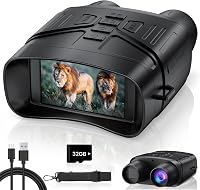
Choose Vtiisamao for a self-contained wildlife viewer that doesn't need a phone as part of your normal routine. It suits watching a feeder, checking a garden or recording activity from a campsite chair.
Vtiisamao 4K Night Vision Binoculars
- 3-inch HD screen
- 5X digital zoom
- 5000mAh rechargeable battery
- 32GB memory card included
- Tripod mount
An included card and tripod mount make this a practical starting point for wildlife recording. Choose it when you want to view and save a scene without building your routine around a phone.
Pros
- Memory card included
- Standard tripod connection
- Screen viewed away from your eyes
Cons
- Tripod supplied separately
- Digital zoom enlarges the image without adding optical detail
The 3-inch HD screen can be viewed without pressing the device against your eyes. Its manual focus lets you sharpen the subject, while 5X digital zoom enlarges the image rather than adding optical detail.
An 850nm infrared illuminator provides black-and-white night viewing, and the device also supports daylight and low-light use. Begin with a broad view, find your subject and focus before enlarging it.
The included 32GB card, neck strap and USB-C cable cover the main setup items. A standard 1/4"-20 tripod connection makes it suitable for watching the same patch of ground without holding it throughout the session.
Skip this pick if your main goal is live phone viewing or a dedicated low-light color mode. Its appeal is a direct screen-and-record workflow, rather than the app tools offered elsewhere here.
For an explanation of the sensor and illuminator, read how digital night vision works.
VISIOGEAR Night Thunder X3: for moonlit observation
Choose the Night Thunder X3 for watching under moonlight or starlight, with infrared available as darkness deepens. Its fixed optical magnification also fits observing a chosen area across an open space.
VISIOGEAR Night Thunder X3
- AI Color Boost Mode
- 5X fixed optical and 8X digital zoom
- Three-level infrared
- Protective case
AI Color Boost uses ambient light before infrared is needed. The fixed optical magnification suits watching a chosen area more than following subjects close to your feet.
Pros
- Ambient-light color mode
- Backlit controls
- Protective case included
Cons
- Memory card supplied separately
- Fixed optical magnification limits the wider view
VISIOGEAR says AI Color Boost Mode enhances ambient light for natural-color viewing and can reduce the need for infrared. It needs light to work with, so a moonlit clearing and a shaded woodland won't produce the same view.
The device combines 5X fixed optical magnification with 8X digital zoom. Fixed optical magnification gives you an already enlarged view; it isn't an adjustable optical zoom that opens back out for close scanning.
Backlit controls help you find buttons after dark. A protective case, neck strap and charging cable are included, but you need a compatible microSD or TF card for recording.
Skip it if you mainly watch nearby animals moving around your feet, where a broader view is useful. Pick it for watching a more distant area and learning when to switch from ambient-light mode to infrared.
Our Bushnell Equinox X650 review covers another digital option for readers still comparing viewing formats.
VOOPEAK: for sharing the view on a phone
Choose VOOPEAK when phone viewing is central to the outing, such as sharing backyard animal activity with family. Direct WiFi supports live footage, recording controls and downloading saved files.
VOOPEAK 4K Night Vision Binoculars
- WiFi app live viewing
- 10 infrared levels
- Motion detection recording
- 32GB card included
Direct WiFi viewing and file transfer suit families who want to share wildlife sightings on a phone. Motion detection adds another way to capture activity within a fixed frame.
Pros
- Phone live view and file transfers
- Motion detection recording
- File transfer requires no cloud subscription
Cons
- Device controls are limited during WiFi use
- App viewing adds setup steps
Files can remain on your own devices, with no cloud upload or subscription required for file transfer. Learn the app connection before going out so the first sighting isn't spent working through phone settings.
There is a practical control trade-off: while WiFi is active, only infrared level and flashlight can be adjusted on the binoculars. Turn WiFi off to restore the other device buttons.
Motion detection recording can start when movement or changes appear within the frame. Aim at a defined area, such as a garden path, and check sample clips before relying on it to capture useful activity.
The adjustable screen brightness and 10 infrared levels give you room to tune the view. Storage starts with an included 32GB card, with support for cards up to 256GB.
Skip VOOPEAK if you want to avoid an app routine. For a different phone-based tool, our best thermal camera for iPhone guide covers heat imaging rather than conventional night scenes.
ROQIOO: for campsite checks from a stopping point
Choose ROQIOO if a built-in compass and visible fill light would help during campsite observations. These extras suit checking your surroundings after you stop, rather than watching a screen while walking.
ROQIOO 4K Night Vision Binoculars
- Built-in compass
- Seven infrared levels
- 3W fill light with SOS mode
- 3-inch IPS screen
A compass and visible fill light suit campers checking their surroundings from a stopping point. Keep separate route guidance and a light available when moving around.
Pros
- Built-in direction reference
- Fill light with flashing and SOS modes
- Memory card included
Cons
- Manual focus needs adjustment as distance changes
- Compass and viewing share the device battery
The compass gives you a direction reference, and the 3W fill light offers lighting, flashing and SOS modes. Keep a separate light and route reference available so those tasks don't all depend on one battery.
Its 850nm infrared illuminator has seven adjustable levels. Use enough illumination to reveal your subject without washing out nearby branches, tent fabric or other bright surfaces.
The viewing setup includes a 3-inch IPS screen, manual focus and 10X zoom. A 32GB memory card, lanyard and Type-C cable come with it, so storage is included for your first recordings.
Skip this model if you mostly observe from home and won't use its outdoor extras. A built-in compass adds little to watching the same garden corner from a chair.
For hunting or use in restricted areas, read our guide to night vision goggles laws before planning the activity.
AKASO Seemor-200: for low-light color viewing
Choose the Seemor-200 when color is the main reason you're buying a digital night viewer. AKASO says its AI-ISP mode produces full-color images in very low light, with infrared available as an alternative.
AKASO Seemor-200 Night Vision Goggles
- AI-ISP full-color mode
- Seven infrared levels
- 16X digital zoom
- Two rechargeable batteries
AKASO's AI-ISP mode targets color viewing in very low light, with infrared available when needed. Two rechargeable batteries and several mounting options suit planned observation sessions.
Pros
- Color and infrared viewing modes
- Two batteries and charger included
- App live monitoring and file transfer
Cons
- Memory card supplied separately
- Color viewing still depends on available light
Color can help you interpret foliage, clothing and other scene features when enough light is available. Don't base an important identification on color alone, especially when the image is dim or heavily enlarged.
The Seemor-200 offers 16X digital zoom and seven infrared levels. Use the wider view to locate a subject, then enlarge only as much as needed to follow it.
Two rechargeable batteries and a charger are included. AKASO states up to 8 hours of continuous use with the supplied batteries; plan a shorter working session when charging access is limited.
The AKASO Aura app supports live monitoring and file transfer. Supply a Class 10 or faster microSD card, with capacities up to 512GB supported.
Top and bottom mounting points allow several accessory arrangements. Skip it if you mainly need simple black-and-white recording, since its color mode and app features are the stronger reasons to choose it.
Ni-SHEN: for occasional campsite recording
Choose Ni-SHEN for occasional viewing and short clips, when a rechargeable device and included storage cover your needs. It fits buyers who want to watch a scene directly without making phone sharing their main task.
Ni-SHEN HD Night Vision Binoculars
- 2.8-inch screen
- 10X digital zoom
- Rechargeable battery
- 16GB card included
A rechargeable viewer with an included card fits occasional campsite observations and short wildlife clips. It suits buyers whose main needs are local viewing and recording.
Pros
- Card and lanyard included
- Day and night use
- Photo and video recording
Cons
- Smaller screen than the 3-inch options
- Less included storage than the other card-equipped picks
The 2.8-inch screen is smaller than the displays on several other picks. Consider how long you'll watch and whether you're comfortable reading the view on that screen before choosing it for extended sessions.
Its 10X digital zoom can enlarge a distant subject, but start without extra enlargement so you can find and follow movement. Infrared supports nighttime viewing, and the device also supports daytime use.
A 16GB TF card, USB cable and lanyard are included. Save short clips and clear space after transferring files, particularly if you're recording throughout a camping trip.
Ni-SHEN describes the shell as water resistant. Keep it sheltered when possible, dry it after damp use and don't treat that description as permission to submerge it.
Skip this pick if you expect long recording sessions or want a larger screen for shared viewing. Its smaller included card makes regular file management more relevant than on the higher-capacity kits.
Melicis: for longer sessions at a fixed viewpoint
Choose Melicis for planned recording from a fixed spot, where carrying weight matters less than battery and storage capacity. A garden chair, observation table or tripod setup fits it better than constant handheld scanning.
Melicis 4K Night Vision Goggles
- 20000mAh rechargeable battery
- 128GB card included
- 16X magnification
- WiFi app and GPS recording
A high-capacity battery, large included card and GPS video records suit longer sessions from a fixed spot. The carrying weight makes it a less appealing choice for frequent handheld scanning.
Pros
- Large included memory card
- GPS location records during video
- App control and file download
Cons
- Heavy at 4.5 lb
- Tripod recommended for extended observation
The 20,000mAh battery and 128GB card are the main reasons to consider it. Melicis states up to 26 hours of daytime recording or 13 hours of night recording, depending on settings and conditions.
A 4.5-inch TFT IPS display provides a larger viewing area, with 16X magnification available. Melicis recommends tripod use for extended observation or higher magnification, and the 4.5 lb weight reinforces that advice.
WiFi app control supports remote shooting, viewing and downloads. Built-in GPS records location during video, with corresponding route information available through the app.
That location record can help organize footage from several stops. Review location information before sharing files if they reveal your home or a sensitive wildlife spot.
Skip Melicis for long walks with frequent handheld use. Also keep its stated 2,000 ft daytime viewing distance separate from nighttime expectations; it isn't a night identification distance.
How do infrared, color modes and digital zoom differ?
Infrared supplies light for the sensor, color modes work with available light, and digital zoom enlarges the image. These functions solve different problems, so a high zoom number cannot replace suitable illumination or accurate focus.
Infrared helps in darkness but needs careful adjustment
An infrared illuminator lights the scene for the camera. More illumination can help at a distance, but nearby leaves, fences and reflective objects can become too bright.
Start with a low setting and raise it gradually. If the foreground turns pale while the background stays dark, change your viewing angle or move past the obstruction.
Avoid aiming through a closed window with infrared on. Reflections can overwhelm the scene beyond the glass, so observe from a safe outdoor position when possible.
Color modes depend on the scene's light
A low-light color mode can be useful where moonlight, nearby buildings or other light reaches the subject. A bright sky doesn't mean an animal beneath dense cover receives enough light for the same result.
Switch modes according to the image you can actually interpret. A clear black-and-white view is more useful than a color image that hides the shape or movement you need to see.
These screen-based devices also differ from image-intensifier equipment. Our digital night vision vs analog guide explains that distinction before you choose a technology.
Optical magnification and digital enlargement aren't interchangeable
Optical magnification enlarges the scene through the optics before the sensor captures it. Digital zoom enlarges a portion of the captured image, making blur and hand movement more obvious.
Focus before adding digital zoom. If fur, fence wire or branch edges already look soft, enlargement will make that softness larger rather than recover the missing detail.
How should you choose for your viewing distance and routine?
Choose for the task you repeat most often, then check whether the device will be comfortable to carry, power and operate. Recording extras matter less if the basic viewing setup doesn't suit your surroundings.
Match the device to a real observation spot
Picture where you'll stand or sit, what you'll watch and what blocks the view. A nearby feeder calls for easy framing and focus, while an open field places more demands on illumination and image detail.
Separate spotting movement from identifying a subject. Seeing an animal-shaped object doesn't mean you can identify its species or make out small features at the same distance.
Long-range claims describe favorable conditions, not every scene. Rain, fog, target size, contrast and foreground objects all affect how useful the view will be.
Decide how much you'll carry
A feature-rich viewer can become tiring if you're holding it up for long periods. Plan a stopping point and support for extended observations rather than choosing entirely by screen size or battery capacity.
For a fixed garden viewpoint, a tripod can be more valuable than extra digital enlargement. For walks between viewing spots, think about the device, strap, protective storage and charging gear together.
Choose a recording workflow you'll maintain
An included card reduces initial setup, but recording also means sorting, copying and deleting files. Short clips of useful activity are easier to manage than hours of footage with little happening.
Phone transfer is worth prioritizing if you share sightings often. If you mainly watch live and save an occasional clip, direct controls and local storage may cover your needs.
Plan power around the whole session
Battery capacity alone doesn't guarantee runtime across different devices. Infrared use, recording, display brightness and temperature affect how long a charge lasts.
For remote trips, plan charging before selecting extra recording features. Built-in batteries need access to charging, while removable battery systems require charged spares and a way to protect them.
Our night vision binoculars and monoculars buying guide covers these choices in more detail, including which viewing format fits your plans.
How do you set up night vision binoculars before going outside?
Charge the device, prepare its storage and learn the controls in daylight. A short practice session makes it easier to focus, change illumination and start recording when something appears after dark.
- Attach and adjust the strap. Keep the device secure while leaving enough room to raise and lower it comfortably.
- Prepare the memory card. Follow the manual's card requirements and formatting steps, copying any existing files before formatting.
- Learn the main buttons. Find power, recording, zoom, brightness and infrared controls without relying on trial and error.
- Focus on a defined object. Use a fence post or branch, then change to another distance so you learn how much adjustment is needed.
- Save a short clip. Play it back and confirm you can transfer it through your chosen method.
- Prepare your viewing position. Set up compatible support on firm ground and leave a clear area around your feet.
After dark, begin with low screen brightness and a broad view. Find the subject, focus, adjust infrared if needed and add digital enlargement last.
For app-equipped devices, confirm the connection and file transfer before leaving home. Keep a normal light available for packing up and walking back.
Which common mistakes spoil the view or shorten a session?
Too much zoom, poor focus and badly aimed infrared cause avoidable problems. Correct those settings before assuming the device needs more power or a larger recording resolution.
- Starting at maximum zoom: Scan broadly first so moving subjects are easier to find and follow.
- Leaving focus unchanged: Refocus when you move from nearby ground to a farther treeline.
- Using maximum infrared nearby: Reduce it if leaves, signs or pale surfaces become washed out.
- Judging clarity by recording labels: A large photo file or 4K video setting doesn't tell you how much distant detail the sensor captures.
- Trusting motion recording immediately: Check the framing and saved clips before leaving it to capture an area of interest.
- Walking while watching the screen: Stop to observe, then lower the device before moving.
Bright displays can also make it harder to see your surroundings when you look away. Keep brightness comfortable and give your eyes time to adjust before stepping into a dark area.
For property checks, use the device as an observation aid. Keep a safe distance from unknown activity rather than moving closer to resolve an unclear image.
How should you clean and store a digital night viewer?
Keep the optics clean, dry the device after damp use and protect the screen during transport. Water resistance varies, so follow each model's instructions rather than treating all outdoor viewers alike.
Remove loose dust before wiping a lens. Use a clean lens cloth with light pressure, and avoid rubbing grit across the surface or using a dirty shirt sleeve.
After an outing, let damp straps and cases dry before packing everything away. When moving between cold outdoors and a warm room, allow time for condensation to clear before cleaning the optics.
Copy important recordings before deleting files or formatting the card. Store the viewer away from heat, and follow its battery instructions for longer periods without use.
Check straps, covers and mounting connections before the next trip. A loose connection is easier to address at home than beside a dark trail.
Which night vision binoculars should you choose?
Choose Vtiisamao for straightforward viewing and recording, VOOPEAK for phone sharing or VISIOGEAR for observation where ambient light is available. Pick AKASO when low-light color is the feature you value most.
ROQIOO suits campsite checks where its compass and light will be useful. Ni-SHEN fits occasional recording, while Melicis makes more sense for supported sessions than frequent handheld use.
The best night vision binoculars for you should match a real viewing spot and a routine you'll maintain. Before ordering, settle where you'll observe, how you'll support the device and how you'll save the recordings.
For one-eye viewing, compare the best night vision monocular. If finding heat is your main task, start with our thermal camera guide.
Our top 3 picks at a glance
-
1
Best for first-time wildlife watchers
Vtiisamao 4K Night Vision Binoculars
8.0/10 our score
See it on Amazon -
2
-
3
Frequently asked questions
What should I look for in night vision binoculars?
Choose the viewing mode for your surroundings first, then compare carrying weight, focus, battery arrangements and storage. Optical magnification and digital zoom serve different purposes, so don't rank devices by the largest number.
For longer observations, a compatible tripod and comfortable screen can matter more than extra recording features.
Are digital night vision binoculars useful in daylight?
Yes, many digital models support daytime viewing, including Vtiisamao, VISIOGEAR and Ni-SHEN. Switch to the correct mode and leave infrared off when it isn't needed.
Our guide to using digital night vision during the day explains practical considerations for a device you plan to use from afternoon through darkness.
Do night vision binoculars need a memory card?
A compatible memory card is needed for saving recordings on these devices, but live viewing and saving files are separate tasks. Several picks include storage, while VISIOGEAR and AKASO require a separate card.
Follow the device's card type, capacity and speed requirements, and confirm it saves a short clip before leaving home.
Should I choose night vision or thermal imaging?
Choose digital night vision for a recognizable scene with features such as branches, fences and animal markings. Choose thermal imaging when finding a warm subject against its surroundings is the main task.
Neither replaces careful identification.
Our night vision vs thermal guide explains how the image types differ and where each helps.