Can You Use Digital Night Vision During the Day?
Yes, you can use digital night vision during the day if your model supports daytime viewing. Select its daytime settings, leave infrared illumination off in ordinary daylight, and never aim it at the sun.
On this page (7 sections)
- Can you use digital night vision during the day?
- How should you set up digital night vision for daylight?
- Which day-and-night device should you choose?
- Which features matter most for daytime use?
- What mistakes should you avoid in daytime and nighttime use?
- How should you care for a day-and-night device?
- Is digital night vision the right choice for your daytime viewing?
Yes, you can use digital night vision during the day if your device supports daytime viewing. Choose its daytime settings, keep infrared illumination off in ordinary daylight, and never point it at the sun.
A day-and-night model makes sense for watching wildlife before sunset, then continuing after dark with the same device. Choose around viewing comfort, recording needs, and power rather than the largest zoom number.
Can you use digital night vision during the day?
You can use a compatible digital model in daylight because it forms an image with an electronic sensor and screen. Daytime support must be stated for your particular device.
A screen alone doesn't prove that bright conditions are suitable. Check the manual for operating modes, lens-cover instructions, and limits on intense light.
Daytime viewing also doesn't promise the same image as ordinary binoculars or a dedicated camera. Screen resolution, focus, exposure, and available light all affect how much detail you can see.
For a closer look at the technology, read how digital night vision works. Understanding the sensor helps explain why daytime operation and infrared illumination are separate features.
How does digital night vision during the day differ from analog?
Digital night vision displays a sensor image, while analog night vision uses an image intensifier to amplify available light. Don't transfer daylight advice from one type to the other.
Our digital vs. analog night vision guide explains the differences. Follow the instructions for the actual model, including any special daytime cover requirements.
How should you set up digital night vision for daylight?
Start with daytime mode, infrared illumination off, and the lowest available digital zoom. Aim at an ordinary shaded or evenly lit scene while you adjust the controls.
Use this sequence before an outing:
- Check power and storage. Charge the battery or fit the required batteries, then confirm the device recognizes its memory card.
- Follow the lens-cover instructions. Remove or position covers as directed for daytime viewing.
- Select the daytime settings. Don't assume the device has changed modes automatically.
- Adjust focus. Focus on your subject before adding digital zoom.
- Set screen brightness. Use a level you can read comfortably without making the display brighter than necessary.
- Record and review a short clip. Check the saved image, not just the live view.
If a scene looks washed out, reduce any available exposure or brightness setting as the manual directs. Move to a less harshly lit scene if needed; adding infrared illumination won't solve excess daylight.
What changes when you use digital night vision after sunset?
As light fades, switch to the recommended night mode and add infrared illumination when the scene needs it. Refocus after changing distance or modes rather than relying on your daytime adjustment.
Start with the lowest useful IR level if your device offers adjustment. Nearby leaves, fences, or branches can reflect illumination toward the sensor and make a distant subject harder to see.
Which day-and-night device should you choose?
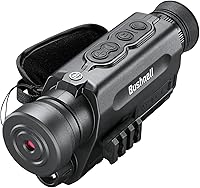
Choose the Bushnell for AA-powered video use, the YUANZIMOO for an included tripod kit, or the Vtiisamao for a larger screen. All 3 support daytime operation, but their layouts and accessories suit different routines.
Bushnell Equinox X650: for AA-powered outings
The Bushnell Equinox X650 suits someone who wants day-and-night video in a monocular format and prefers carrying spare AA batteries. It uses 3 AA batteries and saves footage to a microSD card.
Its 3x optical magnification gives you a closer starting view, while up to 5x digital zoom enlarges the image electronically. Use the optical view to find and focus on a subject before adding digital enlargement.
A tripod-mount adaptor helps when recording from a fixed position, such as a campsite or observation spot. Bushnell claims night viewing up to 650 feet with the built-in IR illuminator; don't treat that as a promise of clear identification at that distance.
Skip it if USB recharging is central to your routine or you prefer viewing a screen held away from your face. Read our Bushnell Equinox X650 review for a closer look at its features.
YUANZIMOO Night Vision Monocular: for a ready-to-set-up kit
The YUANZIMOO suits someone who wants a rechargeable monocular with recording accessories included. It comes with a tripod, 32 GB memory card, card reader, storage bag, and carrying straps.
Its 2000 mAh rechargeable battery supports charging from a power bank or car charger. Photo, video, and playback modes let you save a scene and review it without first transferring files.
The 1.5-inch screen favors a compact viewing setup, while the included tripod helps with fixed observation. Its 2x optical magnification and 8x digital zoom should be judged separately: digital enlargement doesn't add captured detail.
Skip it if a larger display is your main priority. YUANZIMOO claims night viewing up to 984 feet and provides 7 IR levels, but neither figure establishes how clearly you can recognize a distant animal.
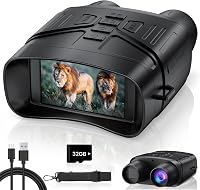
Vtiisamao 4K Night Vision Binoculars: for screen-based viewing
The Vtiisamao suits someone who prefers a 3-inch screen held away from the eyes. That layout is useful if you dislike keeping an eyepiece against your face during a long observation session.
It supports daytime and nighttime photos and video, with a 32 GB card included. The built-in 5000 mAh rechargeable battery charges through the supplied USB-C cable.
Manual focus and 5x digital zoom let you adjust the view, while a standard 1/4"-20 mount supports stationary recording. A tripod isn't included, so account for one if most of your viewing will be from a fixed spot.
Skip it if you want an eyepiece-style monocular or a kit that already includes a tripod. The larger battery capacity alone doesn't guarantee longer runtime than another device because the screen, IR level, and recording settings also draw power.
Which features matter most for daytime use?
Prioritize viewing comfort, focus, power, and recording controls before maximum zoom or night range. Those features affect every daytime session.
For one-handed observation with an eyepiece-style device, compare our best night vision monoculars. For a screen-based format, our night vision binoculars buying guide explains the main choices.
Optical magnification and digital zoom do different jobs. Optical magnification enlarges the subject through the optics; digital zoom enlarges the captured image and can make softness or shake more obvious.
Higher magnification also makes finding a moving subject harder. Start wide, locate the animal, focus, and only then zoom closer.
Choose your power system around access to charging. Replaceable batteries suit trips where carrying spares is easier, while rechargeable models suit regular use near a charger or compatible power bank.
For recording, check how easily you can reach the controls without losing your subject. A large video-resolution label doesn't settle focus quality, motion detail, or viewing comfort.
What mistakes should you avoid in daytime and nighttime use?
Avoid excessive digital zoom, unnecessary IR, and judging recordings only from the live screen. These habits can waste power or leave you with footage that doesn't show the detail you wanted.
Don't confuse detection with identification. Seeing movement or a bright shape at a claimed maximum range doesn't mean you can reliably recognize what it is.
Don't assume that the word “goggles” means a device is wearable or suitable for walking. A screen view can limit awareness of nearby obstacles, so stop moving before observing.
Keep strong reflections in mind when filming through a window. Interior light can reflect in the glass during daytime, and built-in IR can bounce back toward the sensor after dark.
Avoid leaving the device on while you aren't watching. Screen use, recording, and illumination all consume power, so turn off functions you don't need.
How should you care for a day-and-night device?
Keep the lenses clean, the device dry, and saved files backed up. Follow the manual for weather exposure, cleaning materials, charging, and storage.
Remove loose dust before wiping a lens with a suitable lens cloth. A shirt sleeve or gritty cloth can drag dirt across the surface.
Don't assume outdoor use means waterproof construction. Keep the device protected from rain unless its instructions explicitly permit that exposure.
Transfer important recordings before clearing the card, and use the device's recommended formatting method. Store it with the lens protected, and follow its battery-storage guidance between trips.
Is digital night vision the right choice for your daytime viewing?
You can use digital night vision during the day, but buy for the conditions you'll use most. If you only observe in daylight, ordinary binoculars or a dedicated camera may serve you better without adding infrared controls and screen power needs.
Choose the Bushnell if spare AA batteries and monocular video fit your outings. Pick the YUANZIMOO for a rechargeable kit with an included tripod, or the Vtiisamao for a larger screen and viewing away from the eyepiece.
If your plans regularly continue past sunset, a day-and-night device can cover both parts of the outing. Use our night vision binoculars buying guide to match the viewing format to your routine before choosing zoom.
Frequently asked questions
Can you use digital night vision during the day?
Yes, you can use digital night vision during the day when your model supports daytime operation. Select its recommended daytime settings and keep infrared illumination off in ordinary daylight; check the manual for lens-cover instructions and bright light limits before using the device outdoors.
Should the infrared illuminator be on during the day?
No, the infrared illuminator generally should be off in ordinary daylight. It adds light for the sensor when the scene is too dark, so bright outdoor conditions usually don't require it; turning it off also avoids using battery power for illumination you don't need.
Can daylight damage digital night vision?
Daylight is suitable for digital night vision designed for daytime operation, within the manufacturer's instructions. That permission does not cover pointing the device at the sun or ignoring limits on intense light; keep the objective covered during storage and follow the manual for safe use in bright conditions.
Can digital night vision record video during the day?
Yes, all 3 devices covered here support daytime video recording. Before an outing, select the correct mode, check available memory, and record a short clip of an ordinary scene; play it back to confirm focus and framing, and transfer important files before formatting the card.