How to Choose Night Vision Binoculars and Monoculars
This night vision binoculars buying guide starts with your viewing distance and how you want to see the image. Choose a screen-based device for stationary observation or a monocular for one-eye viewing, then compare infrared, focus, storage and power.
On this page (11 sections)
- Where should a night vision binoculars buying guide start?
- Are binoculars or a monocular better for night vision?
- What does infrared illumination change?
- Which screen, zoom and focus features matter?
- Do you need recording, Wi-Fi or motion detection?
- How should you compare battery and mounting options?
- Which night vision binoculars and monoculars fit these priorities?
- How do you set up night vision before the first outing?
- How should you care for digital night vision?
- What mistakes should you avoid before buying?
- Night vision binoculars buying guide: which should you choose?
Choose night vision binoculars by viewing distance, display comfort and power needs, then add recording features only if you’ll use them. This night vision binoculars buying guide explains how to match those choices to backyard watching, camping and stationary wildlife observation.
Start with what you need to see: movement across a yard, an animal’s outline or enough detail to identify it. Those are different goals, and a large zoom number or long advertised range won’t answer all 3.
The word “binoculars” also needs care. Many digital models show a camera image on a shared screen rather than providing the separate optical views you get through regular binoculars.
Where should a night vision binoculars buying guide start?
Start with your usual scene and the detail you need, rather than a maximum range figure. A device for watching a nearby feeder has different demands from one used across an open field.
Write down your likely viewing distance, available light and session length. Add whether you’ll stay in one place, move between stops or save footage for later.
| Your situation | Prioritize | Main trade-off |
|---|---|---|
| Backyard animal watching | Easy focus, adjustable infrared and screen brightness | Nearby branches can reflect infrared light |
| Family camping | Simple controls and a clear charging plan | Extra phone features add setup steps |
| Stationary wildlife observation | Stable mounting and useful image detail | A tripod adds equipment to carry |
| Saving animal clips | Card support and straightforward file transfer | Recording uses storage and battery power |
| Brief checks between stops | Comfortable grip and accessible controls | Shape alone doesn’t establish carrying comfort |
Decide whether you need to detect or identify a subject. Seeing something move at the edge of a field is easier than distinguishing similar animals at that distance.
Thermal imaging may suit a search for warm subjects, while night vision shows reflected light and visible scene detail. Read night vision vs thermal before choosing if finding animals matters more than recording a recognizable landscape.
Are binoculars or a monocular better for night vision?
Choose the viewing arrangement you can use comfortably, not the name on the housing. A shared screen suits viewing at some distance from your face; a monocular provides a one-eye view.
With a screen-based device, check whether you can see the whole display while holding the controls. If you wear glasses, consider how easily you can move between the screen and your surroundings.
A monocular suits buyers who prefer bringing one viewing point to an eye for brief checks. It can also leave the other eye uncovered, though you should still stop and look around directly before moving.
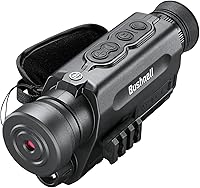
The Bushnell Equinox X650 is a handheld digital monocular with a tripod-mount adaptor. Its optical magnification gives it a different starting point from devices that rely on digital enlargement alone.
Compare more options in our best night vision monocular guide. For shared-screen designs, our best night vision binoculars roundup helps narrow the choice.
Don’t buy either form as a substitute for seeing your footing. Stop walking before observing, especially near steps, roots, water or uneven ground.
What does infrared illumination change?
Infrared illumination supplies light for the sensor in darkness, usually producing a black-and-white image. Adjustable levels help you balance nearby glare against the light needed for a more distant subject.
Begin with a low infrared setting and increase it only until the subject becomes useful to view. Excess light can wash out a nearby animal or brighten foreground leaves while the background remains dark.
Avoid observing through a closed window with the built-in illuminator on. Infrared can reflect from the glass back toward the sensor, obscuring the scene outside.
An 850nm illuminator, such as the one on the Vtiisamao, can produce a faint red glow at its emitter. Don’t assume infrared observation is invisible to every person, animal or other night vision device.
Some digital models also offer color viewing in low light. The AKASO Seemor-200 provides full-color and infrared black-and-white night modes, with 7 adjustable infrared levels.
Color can help distinguish parts of a scene, but useful results still depend on available light and subject movement. Switch modes when needed rather than expecting color to remain the best choice in every setting.
For the technology differences behind these choices, read digital vs analog night vision.
Which screen, zoom and focus features matter?
Focus and usable detail matter more than maximum digital zoom. Choose a display you can read comfortably, then judge magnification by the distance and size of your usual subjects.
Optical magnification enlarges the view through the optics. Digital zoom enlarges part of the captured image, so it cannot restore detail the sensor didn’t capture.
Start at the lowest zoom setting to find your subject. Increase magnification only after you’ve focused, because a tighter view makes movement harder to follow and hand shake more obvious.
The Vtiisamao has a 3-inch screen and manual focus. It suits buyers who want to view without pressing the device against their eyes.
Refocus when you switch from a nearby fence to a distant tree line. Changing digital zoom is not a substitute for turning the focus control.
How should a binocular buying guide handle range claims?
Use claimed range as a rough comparison, then match it to your intended task. A visible shape at a long distance may still lack the detail needed for identification.
VOOPEAK claims viewing up to 1500 ft under suitable conditions, while AKASO advertises up to 3280 ft and Bushnell up to 650 ft. These figures do not guarantee equal image detail or comparable conditions.
Mist, rain, foreground plants and weak illumination can limit a useful view. Don’t choose solely by the largest distance if most of your observation happens within a yard or campsite.
Likewise, 4K recording describes an output format, not a promise of sharp detail in every night scene. Focus, light, motion and steady support all affect the footage you save.
Do you need recording, Wi-Fi or motion detection?
Choose recording for keeping observations and Wi-Fi for sharing or remote viewing. If you only want a quick look outside, neither needs to drive your choice.
Memory-card recording lets you save a clip without managing a phone at the same time. Phone transfer becomes more useful when you regularly share footage or want to review it on another screen.
VOOPEAK supports app live viewing, file transfer and motion detection recording. Its transfer workflow can keep files on the device, memory card and phone without requiring a cloud upload or subscription.
While VOOPEAK’s Wi-Fi mode is active, only infrared level and the flashlight remain adjustable on the device. Set up the view first if you expect to use the phone connection during observation.
Motion detection responds to movement or changes in the frame, not just the animal you hope to record. Moving foliage, shifting light or a bumped support can fill storage with unwanted clips.
Aim a motion-recording setup at a small area of interest, with as little moving foreground as possible. Don’t assume this feature makes a handheld viewer suitable for permanent outdoor security duty.
Check recording and playback before leaving home. A card that fits physically may still need formatting or may not meet the device’s capacity and speed requirements.
How should you compare battery and mounting options?
Choose a power system you can replenish during your trip, and use a mount for long observations from one spot. Battery capacity alone doesn’t tell you how long a device will run.
Infrared, display brightness, Wi-Fi and recording all draw power. Compare runtime figures only when their operating conditions are similar, and leave a reserve for the walk back or an unexpected delay.
A built-in rechargeable battery is simple for evenings near a charger. Removable batteries or replaceable cells offer another way to plan longer outings, provided you carry compatible spares.
For a tripod setup, check the mounting thread, clearance around the controls and access to charging or card slots. Balance the device before letting go, and avoid forcing a screw that doesn’t turn easily.
A mount also helps you compare infrared settings without changing the view. It won’t freeze a moving animal, so save footage when the subject pauses if you need clearer detail.
Helmet attachment points describe a mounting option, not suitability for walking through darkness. Viewing delay, magnification and a restricted view can all make movement harder.
Which night vision binoculars and monoculars fit these priorities?
Choose Vtiisamao for straightforward screen viewing, VOOPEAK for phone features, AKASO for color and infrared choices, or Bushnell for a monocular. Each serves a different routine.
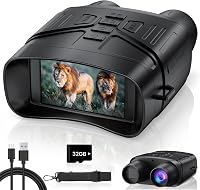
Vtiisamao 4K Night Vision Binoculars
Choose Vtiisamao for casual observation without an app-centered workflow. Its included 32GB memory card, neck strap and USB-C cable cover the basics for starting with recording and rechargeable power.
The built-in 5000mAh battery suits buyers who can recharge between outings. There’s no fixed runtime to plan around here, so learn how your preferred infrared and display settings affect a session before taking it farther from power.
Its standard 1/4"-20 mount supports a separate tripod for watching a feeder or yard from one position. A tripod is not included.
Skip it if phone live viewing or motion-triggered recording is essential. VOOPEAK provides those specific features, while this model is the clearer fit for direct screen use.
VOOPEAK 4K Night Vision Binoculars
Choose VOOPEAK for sharing clips and watching through a phone. Its display offers 6 brightness levels, and storage can expand from the included 32GB card to a supported card up to 256GB.
VOOPEAK gives battery estimates of up to 15 hours with infrared off and up to 9 hours with infrared on, depending on settings. Plan around your actual mix of recording and connected use rather than the longest figure.
Its zoom information needs clarification before a zoom-led decision: the feature description gives 12x digital zoom, while the maximum-magnification specification gives 10x. Ask for confirmation if that difference affects your choice.
Skip it if you want all device buttons available during phone viewing. Buyers who rarely transfer clips may also find little reason to make connectivity their main priority.
AKASO Seemor-200 Night Vision Goggles
Choose AKASO for switching between color and infrared night views. Its Aura app supports live phone monitoring and file transfer, while 2 rechargeable batteries and a charger provide a removable-battery setup.
Bring your own microSD card, up to the supported 512GB capacity. AKASO recommends Class 10 or faster cards, which matters if recording is central to your plans.
Top and bottom 1/4-inch attachment points allow several mounting arrangements. Its IPX5 water-resistance rating covers water jets under specified conditions, not immersion, so protect open compartments and follow the care instructions.
Skip it if carry weight is your deciding factor until you confirm the device-only weight. AKASO’s details conflict, giving less than 500 g in one place and 1.19 kg in another.
Bushnell Equinox X650
Choose Bushnell for a handheld one-eye view and AA power. It uses 3 AA batteries, which are included, and records day or night video to a microSD card.
That power format suits buyers who prefer packing replacement cells rather than planning every stop around charging. Carry a fresh matched set and keep spare batteries protected from loose metal objects.
Its manual focus lets you adjust for the subject distance. For a closer look at this model’s features, read our Bushnell Equinox X650 review.
Skip it if a shared screen or phone live viewing is central to your routine. Buyers who dislike holding a viewer to one eye should start with the screen-based options.
How do you set up night vision before the first outing?
Learn the controls in daylight, then adjust the image outdoors after dark. Finding focus, infrared and recording buttons at home saves time when an animal appears briefly.
- Prepare power. Charge rechargeable batteries or fit the required cells, following the manual.
- Prepare storage. Back up existing files before formatting a compatible card in the device.
- Secure the device. Fit the strap and check any tripod connection before lifting or releasing it.
- Find a fixed subject. Start with a fence post or tree at your likely viewing distance.
- Adjust the image. Use low zoom, set focus and raise infrared gradually.
- Check a saved clip. Play it back and confirm that your transfer method works.
Keep screen brightness low enough for comfortable viewing. A bright display can make it harder to see your surroundings when you lower the device.
Keep a separate light available for finding equipment and walking safely. For more on daytime operation, see using digital night vision during the day.
How should you care for digital night vision?
Keep optics clean, connections dry and the device protected between outings. Dirt and condensation can obscure a view even when focus and illumination are set correctly.
Remove loose grit with an air blower before using a lens cloth. Don’t rub a dusty lens with clothing, which can drag particles across the surface.
Let a cold device warm gradually in its closed bag when bringing it indoors. Wait for moisture to clear before opening compartments, charging or putting it away for storage.
Dry straps and cases before packing them around the device. Follow the manual for battery storage, and remove replaceable cells for long storage when instructed.
What mistakes should you avoid before buying?
Avoid choosing by zoom, range or camera resolution alone. The better choice fits your viewing routine without adding features you won’t use.
- Confusing a screen device with traditional binoculars: Check how your eyes actually view the image.
- Expecting maximum infrared to solve every scene: Nearby reflections can make the image worse.
- Forgetting the recording accessories: Account for a compatible card and any separate mount.
- Planning from maximum runtime: Allow for infrared, display, recording and phone use.
- Assuming motion recording means weatherproof surveillance: Confirm the intended operating conditions.
- Buying before checking local rules: Location, wildlife activity and intended use can affect what’s allowed.
Our guide to whether night vision goggles are legal explains the questions to check before using one in a new location.
Night vision binoculars buying guide: which should you choose?
Choose Vtiisamao for direct screen viewing or VOOPEAK for phone sharing and motion recording. Pick AKASO when color and infrared modes matter, or Bushnell when you prefer a monocular and replaceable AA power.
Before ordering, settle 3 things: your usual subject distance, how you’ll power the device and whether you need saved footage. Those answers narrow the choice more usefully than the largest number on the box.
Use this night vision binoculars buying guide to define your needs, then compare the options in our best night vision binoculars guide for your final shortlist.
Frequently asked questions
Are night vision binoculars better than a monocular?
Choose binocular-style night vision for a viewing arrangement you find comfortable during longer observations, or a monocular for a one-eye view. Many digital binocular-style devices use a shared screen rather than separate optical views, so check the actual display design before choosing by shape alone.
What does an infrared illuminator do?
An infrared illuminator lights a scene for a compatible night vision sensor, allowing black-and-white viewing in darkness. Start at a low level and increase it as needed, since nearby leaves, glass and other reflective surfaces can create glare; more infrared power does not always produce a clearer picture.
Can digital night vision record video?
All 4 devices covered here support video recording, but their storage and transfer options differ. Confirm that you have a compatible memory card, enough free space and sufficient battery power before leaving home; phone connectivity is useful for sharing, but it is not required for every recording workflow.
Can I use night vision in daylight?
Some digital night vision devices support daylight use, including the Vtiisamao, VOOPEAK and Bushnell models discussed here. Follow each model's instructions and keep the optics away from direct sunlight; guidance for digital devices does not automatically apply to analog image-intensifier equipment, which handles bright light differently.
Should I choose digital or analog night vision?
Choose digital night vision when screen viewing, recording and phone transfer matter most to your routine. Analog equipment uses an image intensifier and requires a different comparison of viewing comfort, light handling and power needs; our guide to digital vs analog night vision explains those trade-offs.