FLIR ONE vs TOPDON: Which Phone Thermal Camera Wins? (October 2026)
In this TOPDON vs FLIR comparison, choose TOPDON for higher native resolution and broader device support. Choose FLIR for guided home inspections and visible outlines on a compatible USB-C iPhone.
On this page (9 sections)
- TOPDON vs FLIR: which phone thermal camera has more detail?
- Which one works with your phone?
- Which camera suits home inspections?
- Which temperature figures matter for your work?
- How should you set up either phone thermal camera?
- Which common mistakes can lead to a wrong conclusion?
- How do you protect a phone thermal camera between scans?
- TOPDON TC002C Duo vs FLIR ONE Pro: who should buy each?
- Which TOPDON vs FLIR choice should you make?
Choose TOPDON for native thermal detail and broader device support, or FLIR for guided inspections and visible image outlines on a supported iPhone. This TOPDON vs FLIR comparison comes down to your phone, the objects you'll inspect and how much guidance you want.
The TOPDON TC002C Duo suits buyers who want to examine heat patterns across compatible phones and tablets. The FLIR ONE Pro suits iPhone users who want help connecting those patterns to recognizable parts of a room or machine.
Neither attachment turns a colored image into a diagnosis. The useful result is finding an area worth checking, recording it clearly and confirming the cause with another method.

TOPDON vs FLIR: which phone thermal camera has more detail?
The TOPDON TC002C Duo has higher native thermal resolution. FLIR adds visible outlines that can make a thermal scene easier to recognize, which solves a different problem from capturing more thermal pixels.
TOPDON captures 256 x 192 native thermal images and enhances them to 512 x 384 with TISR. FLIR captures 160 x 120 native IR images and enhances them to 480 x 360 with VividIR.
Native resolution describes the thermal image before enhancement. More native pixels can help separate nearby temperature patterns, although distance, target size and viewing conditions still affect what you can resolve.
For example, a broad cool patch on a wall presents a different challenge from several small warm parts close together. Buyers comparing small areas should give native resolution more weight than those mainly scanning whole windows or doors.
What does FLIR MSX add?
FLIR's MSX adds visible edges and outlines to the thermal view in real time. Those details help you identify which pipe, fitting or section of trim lines up with a warm or cool patch.
An outline doesn't add a new temperature measurement. Its value is context, especially when a thermal image alone makes several nearby objects look like one shape.
FLIR says VividIR combines multiple images to improve detail and reduce blur. This processing serves a different role from MSX, so don't treat the two features as interchangeable.
Does resolution decide the TOPDON vs FLIR choice?
Resolution should lead your choice when small thermal patterns matter most, but it shouldn't outweigh phone support or useful inspection tools. A sharper image still needs sound interpretation.
TOPDON also provides a 25 Hz refresh rate and 40 mK thermal sensitivity. Refresh rate concerns how often the image changes, while sensitivity concerns small temperature differences, not absolute temperature accuracy.
For help comparing these terms, read our guide to thermal camera resolution, range and price. Our complete thermal camera buyer's guide explains how they fit into a broader buying decision.
Which one works with your phone?
The TOPDON TC002C Duo supports compatible USB-C devices across more platforms; this FLIR version supports USB-C iPhone 15 and newer. A matching socket alone doesn't guarantee compatibility.
TOPDON supports compatible smartphones and tablets running iOS, Android or Windows. It doesn't support Mac devices, and Android 16 support is temporarily unavailable.
For Android 10, TOPDON advises upgrading to a later version or downloading its compatible app. Check both your device model and operating system before ordering, especially if an update is pending.
Choose TOPDON for a shared household tool only after confirming every device you plan to use. Broad platform support is useful, but it doesn't promise that every phone or tablet will work.
Skip this FLIR version if you use Android or an older iPhone with a different connector. Skip TOPDON if your current device falls within its stated exclusions.
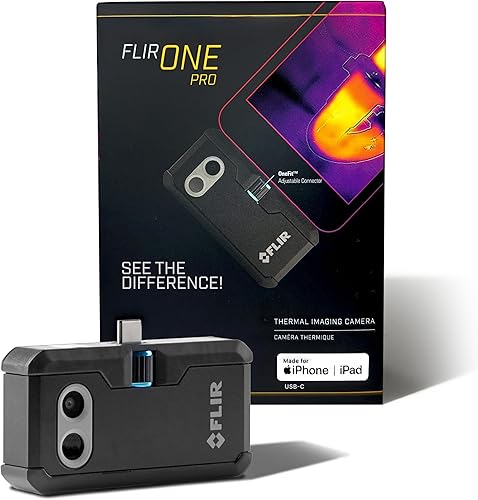
FLIR's adjustable OneFit connector helps it fit with almost any phone case. With either attachment, check that the connector seats fully without forcing it or leaving the camera hanging at an angle.
Our guide explains whether an iPhone has a thermal camera if you're new to attachments. To compare FLIR's own options, see FLIR ONE vs FLIR ONE Pro.
Which camera suits home inspections?
Choose FLIR for a guided inspection routine and TOPDON if you prefer to plan your own scans while prioritizing native thermal detail. Both still require you to understand what a surface temperature pattern can show.
FLIR's app includes step-by-step inspection guidance for typical faults, including air leaks and moisture buildup. That suits a homeowner who wants a clearer process for moving through a room.
TOPDON uses the TopInfrared app and supports photo and video recording. Its custom temperature limits and waveform display suit buyers who want to track changes rather than save only a single image.
For insulation checks, compare similar surfaces under similar conditions. A shaded wall and a sunlit wall can look different because of recent heating, even when their construction is the same.
Scan around window frames, doors and wall-to-ceiling joints, then examine unusual patterns more closely. Our guide to finding drafts and insulation gaps with a thermal camera explains how to plan those checks.
For suspected leaks, use a thermal pattern to choose where to investigate further. A cool patch can have several causes, and moisture confirmation may require a moisture meter or direct inspection.
Read our guide to thermal cameras for finding water leaks before treating a colored patch as evidence of water. A thermal camera shows surface temperature differences, not water inside a wall.
Which temperature figures matter for your work?
Measurement range and temperature accuracy answer different questions. Range tells you which temperatures a camera can measure, while accuracy describes how close a reading may be under stated conditions.
TOPDON specifies a range of -4°F to 1022°F, with error up to ±2°C or 2%. That range is relevant if your planned work includes surfaces far hotter than typical walls and windows.
FLIR specifies ±3°C or ±5% accuracy when the camera is between 15°C and 35°C and the scene is between 5°C and 120°C. These conditions don't define its full measurement range.
The figures aren't enough to declare an accuracy winner across every task. Surface material, reflections, distance and camera settings can all affect the reading you get.
For a home draft scan, the pattern between neighboring areas often matters more than a single temperature label. For machinery or repair work with a required temperature limit, confirm that the camera and measurement method meet that requirement.
TOPDON describes temperature-difference measurement from up to 16.4 ft away. Don't read that distance as a promise that a tiny target will remain clear or measurable from across a room.
Move closer when safe so the area of interest occupies more of the image. A small target surrounded by hotter or cooler material can be harder to measure cleanly.
How should you set up either phone thermal camera?
Start with the correct app, a secure connection and a simple reference scene. Learning the controls on an ordinary wall or door is easier than learning them while investigating a suspected fault.
Install the supported app and review its permissions before your first planned scan. Confirm that the live view responds, then save an image and make sure you can find it afterward.
Support the phone while attaching the camera, and hold the phone rather than lifting the whole setup by the accessory. Remove a case if it prevents a straight, secure connection.
Let the camera settle after moving between very different ambient temperatures, following its instructions. A camera brought from a cold vehicle into a warm room shouldn't be rushed into a measurement that matters.
If the app provides emissivity settings, use guidance appropriate to the surface you're viewing. Emissivity describes how a surface emits infrared energy, and the wrong setting can distort an absolute temperature reading.
Start with a painted wall or another dull surface rather than shiny metal. Reflective surfaces can show heat from you or nearby objects, making them poor practice targets.
Save a normal photo or a short location note alongside each important thermal image. A close-up of a cool patch is much less useful later if you can't identify the room, wall and exact spot.
Which common mistakes can lead to a wrong conclusion?
The biggest mistake is treating color as proof of a defect. A thermal camera reveals patterns that need context, and the same color can mean different temperatures in different images.
Comparing colors across separate scans
An automatically adjusted color scale may change as the hottest and coolest parts of the scene change. Red in one image therefore doesn't necessarily mean the same temperature as red in another.
Compare the temperature scale and labels, not just the palette. For before-and-after repair images, keep the angle, distance and room conditions as consistent as you can.
Mistaking reflections for hot components
Shiny pipes, metal covers and glass can reflect infrared energy from nearby sources. Change your viewing angle and watch whether the apparent hot area moves.
A moving reflection deserves a different interpretation from a fixed heat pattern. Don't place tape or other reference material on hot or energized equipment to improve a reading.
Scanning at the wrong time
Insulation gaps are easier to spot when there is a useful temperature difference across the building surface. A mild day with nearly equal indoor and outdoor temperatures can hide patterns you hoped to find.
Recent sunlight, cooking or a heating cycle can also affect a scene. Record those conditions so you don't mistake normal heating for a building fault.
Assuming the camera sees inside objects
Neither attachment provides a view through a wall. It measures infrared energy from visible surfaces, where hidden conditions may sometimes cause a temperature pattern.
Learn how to read thermal images before drawing conclusions from a scan. For repair decisions, combine the image with a physical check or a qualified professional's assessment.
Don't open energized electrical panels for a home scan. An ordinary-looking thermal image also doesn't mean wiring or equipment is safe.
How do you protect a phone thermal camera between scans?
Protect the lens, connector and attached phone each time you use the camera. Both models depend on a small physical connection that can be strained during storage or movement.
Disconnect the attachment before putting your phone into a pocket or bag. Store it where keys, grit and loose tools can't rub against the lens or bend the connector.
Follow the camera's cleaning instructions and avoid rubbing the lens with a shirt or paper towel. Don't use household cleaners unless the instructions allow them.
Keep the attachment dry unless its instructions expressly permit the exposure you have in mind. A drop specification doesn't guarantee protection against rain, splashes or immersion.
FLIR is rated for a 1.5 m drop, which is useful for buyers working around tools and hard floors. That rating doesn't mean an attached phone will survive the same fall.
If you often need both hands, repeatedly switch apps or work where an attached phone is awkward, consider a separate handheld camera. Our best thermal cameras for home inspection guide covers that wider choice.
TOPDON TC002C Duo vs FLIR ONE Pro: who should buy each?
Buy TOPDON if device flexibility and native thermal detail match your work. Buy FLIR if guided inspections and visible outlines will help you carry out and document scans on a supported iPhone.
Choose TOPDON for a flexible scanning tool
TOPDON makes sense for a household with several compatible devices or a buyer who wants to use a tablet screen. It's also the stronger fit here when small thermal patterns matter more than app guidance.
Skip it if Android 16 or a Mac is central to your planned setup. Don't buy around a compatibility gap on the assumption that support will arrive before you need it.
Choose FLIR for a clearer inspection process
FLIR makes sense for an iPhone user who wants help following inspection steps and locating thermal patterns on recognizable objects. MSX is particularly relevant when outlines would make saved images easier to explain.
Skip this version if your phone isn't supported. Buyers whose main goal is the greatest native thermal pixel count between these two should favor TOPDON.
The scores are 8.3 for TOPDON and 8.5 for FLIR, but the small gap shouldn't overrule a clear fit. FLIR's guidance won't solve a phone mismatch, and TOPDON's extra pixels won't replace a sound inspection method.
For a closer look at the TOPDON attachment, read our TOPDON TC002C Duo review. For more on FLIR's inspection features, see our FLIR ONE Pro review.
Which TOPDON vs FLIR choice should you make?
Settle the TOPDON vs FLIR decision by naming your supported phone and your first inspection task. Choose TOPDON for flexible device use and thermal detail, or FLIR for guided scans with recognizable outlines.
Before ordering, confirm compatibility and decide how you'll verify an unusual result. That gives the camera a clear job, such as locating a draft to inspect or tracking a surface pattern after a repair.
Plan that first scan with our guide to using a thermal camera at home. A repeatable process will make your images more useful than collecting unexplained hot and cold spots.
Sources
Frequently asked questions
Is TOPDON or FLIR better for a phone thermal camera?
TOPDON is the better fit for supported devices across several platforms and buyers who prioritize native thermal detail; FLIR suits compatible iPhone users who want guided inspections and visible outlines around heat patterns. Choose the camera that supports your phone first, then compare the tools you'll use during a scan.
Which has higher thermal resolution, FLIR ONE Pro or TOPDON TC002C Duo?
The TOPDON TC002C Duo has higher native thermal resolution: 256 x 192 versus the FLIR ONE Pro's 160 x 120; both also create enhanced images through processing. Compare native resolution first, since a larger processed image doesn't mean the sensor captures that many separate temperature samples.
Does the FLIR ONE Pro work with Android phones?
This FLIR ONE Pro version supports USB-C iPhone 15 and newer, so skip it for an Android phone; the TOPDON TC002C Duo supports compatible USB-C Android devices, but Android 16 support is temporarily unavailable. Confirm your exact phone and operating system before choosing an attachment.
Can the TOPDON TC002C Duo measure hotter temperatures than the FLIR ONE Pro?
The figures don't tell you which camera measures hotter temperatures; TOPDON's measurement range is -4°F to 1022°F, while FLIR's stated accuracy applies within specific camera and scene temperatures. Those accuracy conditions aren't FLIR's full measurement range, so they can't support a maximum-temperature comparison between these two models.