10 Best Thermal Camera for Home Inspection (October 2026)
The best thermal cameras for home inspections include the TOPDON TC004 Mini for routine homeowner checks, the TOPDON TC004 Handheld for frequent inspection work, and the Thermal Master Thor002 for detailed inspection reports.
On this page (10 sections)
- How we chose thermal cameras for home inspection
- What separates these home inspection cameras?
- The best thermal cameras for home inspection
- How should you choose a thermal camera for home inspection?
- Do you need a handheld or phone thermal camera?
- How should you set up a home thermal inspection?
- What can a home inspection thermal camera reveal?
- Which mistakes cause misleading thermal readings?
- How should you care for a thermal camera?
- Which thermal camera is best for home inspection?
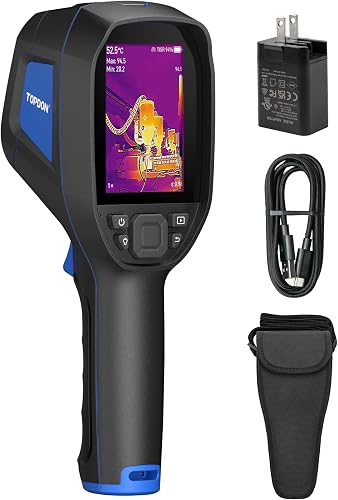
The TOPDON TC004 Mini is the best thermal camera for home inspection for most homeowners who want a self-contained tool for checking walls, windows, floors and heating patterns. Its alerts and photo capture make it useful for routine checks without a connected phone.
Choose the TOPDON TC004 Handheld for more native thermal detail and wireless file transfer. The Thermal Master P1 suits occasional scans through a compatible phone.
Thermal imaging helps you decide where to investigate next. It reveals surface heat patterns, so a suspicious patch needs context before you call it a leak, insulation gap or electrical fault.
For a room-by-room approach, start with how to use a thermal imaging camera at home. For draft checks, follow our guide to finding house insulation problems.
Our picks at a glance
-
1

-
2
-
3

- 4
 Best for guided home scansCheck it
 - 5
 Best for occasional phone checksCheck it
 - 6
 Check it
Flagfront Home Inspection Camera
Best for room surface surveys - 7
 Best for phone analysis workflowsCheck it
 - 8
 Best for extended inspection daysCheck it
 - 9
 Best for Windows report preparationCheck it
 - 10
 Best for quick temperature roundsCheck it
How we chose thermal cameras for home inspection
We favored practical scanning and useful records over extreme temperature limits or the largest enhanced image size. We compared native resolution where available, viewing controls, capture options, transfer methods and portability.
Scores reflect those features and their fit for household inspection tasks. A higher score does not mean the camera can confirm a hidden defect.
The Mini leads for routine homeowner use, while several lower-ranked choices better suit reports, desktop analysis or long inspection days. Choose for your workload rather than treating the ranking as a substitute for that decision.
What separates these home inspection cameras?
The main differences are sensor detail, viewing setup and record keeping. Those affect how closely you can examine an area and how easily you can return to it later.
A wide field of view helps survey a room, but a small target fills fewer thermal pixels when viewed from far away. Move closer when safe rather than relying on a wide scan to resolve fine detail.
Storage alone also tells only part of the story. If you need to send findings to someone else, compare transfer and report tools alongside image capacity.
| Product | Best for | Enhanced resolution | Temperature range | Runtime | Our score |
|---|---|---|---|---|---|
| TOPDON TC004 Mini | routine homeowner checks | 240 x 240 TISR | -4°F to 842°F | Up to 15 hours | 9.2 |
| TOPDON TC004 Handheld | frequent inspection work | Up to 512 x 384 TISR | 8.4 | ||
| Thermal Master Thor002 | detailed inspection reports | 512 x 384 X³ | -4°F to 1022°F | Up to 10.5 hours | 8.2 |
| HSFTOOLS HF96 Thermal Camera | guided home scans | 240 x 240 | -4°F to 1022°F | 8.1 | |
| Thermal Master P1 | occasional phone checks | 320 x 240 X³ | -4°F to 1112°F | 5–8 hours with a connected device | 8.0 |
| Flagfront Home Inspection Camera | room surface surveys | 240 x 240 | -4°F to 1022°F | 7.9 | |
| Rision Magic Thermal Camera | phone analysis workflows | 320 x 240 QuadIR | -4°F to 1112°F | 7.8 | |
| AMPBANK H128 Thermal Camera | extended inspection days | 240 x 240 TISR | Up to 24 hours | 7.7 | |
| Foxwell HT280 Thermal Camera | Windows report preparation | 260 x 260 TISR | 14°F to 932°F | 7.5 | |
| AccuMEMS GT14S Thermal Camera | quick temperature rounds | -4°F to 1022°F | Up to 14 hours | 7.3 |
The best thermal cameras for home inspection
The TOPDON TC004 Mini suits routine household scans; the TC004 Handheld and Thor002 offer stronger reasons to buy for frequent work and documentation. The remaining picks serve specific viewing, analysis or runtime needs.
TOPDON TC004 Mini
- 128 x 128 thermal imaging enhanced to 240 x 240 with TISR
- 40° x 30° field of view
- High, low and center temperature points
- Temperature alerts and automatic photo capture
- Up to 15 hours of runtime
A compact, self-contained choice for routine household scans, with manual photos and automatic capture when an alert triggers. Choose a higher native resolution for smaller inspection targets.
Pros
- No phone needed for viewing
- Temperature alerts with automatic photos
- Up to 15 hours of claimed runtime
Cons
- Charging head not included
- Lower native resolution than the TC004 Handheld
The TOPDON TC004 Mini suits homeowners who want to scan a room, save a concern and put the camera away. Its native 128 x 128 thermal image is enhanced to 240 x 240 with TISR.
Temperature alerts can trigger automatic photos, while manual capture lets you record a wider view for context. Built-in storage holds up to 8,000 photos, and TOPDON claims up to 15 hours of runtime.
That combination fits seasonal checks around windows, exterior walls and heated floors. Save a nearby normal area as well as the suspicious patch so you have a useful comparison later.
Skip it if small inspection targets and detailed records are your main work; the TC004 Handheld has more native thermal pixels and wireless transfer. You'll also need a charging head, since the Mini includes only the charging cable.
TOPDON TC004 Handheld
- 3.5-inch display
- 256 x 192 thermal resolution enhanced to 512 x 384 with TISR
- Laser pointer
- 64GB built-in storage
- Wi-Fi image transfer
Higher native thermal resolution and Wi-Fi transfer make this a stronger fit for frequent scans and organized records. Its larger handheld body adds weight compared with the Mini.
Pros
- More native thermal pixels than the Mini
- Wi-Fi transfer to the TopInfrared app
- Integrated LED light
Cons
- Heavier than the TOPDON TC004 Mini
- Battery runtime needs confirmation for long workdays
The TOPDON TC004 Handheld is the stronger fit for frequent inspections where image detail and file handling matter. Its 256 x 192 native thermal resolution, enhanced to 512 x 384, gives it more sensor pixels than the Mini.
A 3.5-inch screen provides a separate viewer, and Wi-Fi transfers files to the TopInfrared app for analysis and reports. The 64GB storage accommodates images and videos between transfers.
The laser pointer helps relate the image to the target, while an LED light helps you see the surrounding area in dim spaces. Neither feature removes the need to frame the actual concern clearly.
Choose it for recurring work across several rooms or properties. Skip it for occasional quick scans if its 2.11 lb weight is an unnecessary burden, and confirm runtime if uninterrupted work is essential.
Thermal Master Thor002
- 256 x 192 thermal resolution enhanced to 512 x 384
- Visible light camera
- Six temperature points
- Photo and video recording
- Voice notes and QR code file management
Visible images, voice notes and several measurement points help document findings for later review. Its weight and recording tools suit detailed work better than quick household checks.
Pros
- Visible light camera for location context
- Voice notes and QR file management
- Wi-Fi pairing with phones and iPads
Cons
- Heavier than the compact handheld choices
- More controls to learn for occasional use
The Thermal Master Thor002 suits buyers who need to explain findings later, rather than simply locate a temperature difference. Its visible light camera and voice notes help preserve the location and context of a concern.
It starts with 256 x 192 thermal resolution and enhances the image to 512 x 384. Six measurement points let you compare the center, extremes and 3 selected spots within the scene.
Photo and video recording, QR code file management and Wi-Fi pairing with phones and iPads support a more detailed record. Use notes to identify the room, wall and operating conditions instead of leaving yourself an unexplained color image.
Choose it when documentation is a regular part of the job. Skip it for brief homeowner checks if the 3.12 lb weight and extra controls outweigh the value of those records.
HSFTOOLS HF96 Thermal Camera
- Thermal images enhanced to 240 x 240
- IntellFault scene detection for suspected leaks and insulation gaps
- 50° field of view
- High, low and center temperature points
- Up to 11 hours of runtime
HSFTOOLS designs IntellFault scene detection to flag suspected leak and insulation-gap locations. Manual level and span controls help examine those patterns, but the camera does not measure moisture.
Pros
- Scene guidance for common building concerns
- Manual level and span adjustment
- Video recording and Windows analysis software
Cons
- Scene detection cannot confirm moisture
- Scene features may require a firmware update
The HSFTOOLS HF96 suits beginners who want guidance while scanning for building concerns. HSFTOOLS designs IntellFault scene detection to flag suspected leak and insulation-gap locations, but it provides no moisture readings.
Manual level and span controls are useful once you've found a pattern. They let you focus the displayed colors on a narrower temperature band instead of letting a distant hot object dominate the image.
The camera also records video and supports Windows analysis through HSF Studio. A tripod mount helps when you want to observe the same surface without changing the viewing position.
Choose it if scene guidance and manual image controls both appeal to you. Skip it if your main need is to confirm dampness, and install the required firmware before expecting the scene feature to be available.
Thermal Master P1
- USB-C phone and computer connection
- 160 x 120 thermal resolution enhanced to 320 x 240
- 15x digital zoom
- High and low temperature alarms
- Isotherm mode
A small attachment for buyers who want thermal viewing on a compatible phone rather than another handheld screen. Lightning-port iPhones require a separate adapter.
Pros
- Small camera body
- Adjustable emissivity, ambient temperature and distance
- Extension cable and zipper case included
Cons
- Depends on a compatible connected device
- Lightning adapter sold separately
The Thermal Master P1 suits occasional inspections when you prefer a small attachment to a separate handheld. It connects to compatible USB-C iOS, Android and Windows devices through the Thermal Master app.
Its native 160 x 120 thermal image is enhanced to 320 x 240. High and low alarms and an isotherm mode help highlight chosen temperature conditions.
The included extension cable gives you another way to position the camera without moving the whole phone. Support the attachment and cable so the device port does not carry unnecessary strain.
Choose it when compact storage and phone viewing matter most. Skip it if you want independent controls and a screen that stays ready while your phone handles other tasks; Lightning-port iPhones also need an adapter sold separately.
Flagfront Home Inspection Camera
- Thermal images enhanced to 240 x 240
- 50° field of view
- High, low and center temperature display
- Temperature alarms
- 6.6-ft drop resistance and IP54 rating
Broad coverage and temperature alarms suit initial scans across walls, ceilings and floors. Buyers who need saved reports should confirm image storage and transfer capabilities before choosing it.
Pros
- Wide view for surface scans
- High and low temperature alarms
- Adjustable distance and emissivity
Cons
- Photo storage capacity needs confirmation
- Image transfer options need confirmation
The Flagfront Home Inspection Camera suits initial surveys across walls, floors and ceilings. Its 50° field of view covers a broad surface, while temperature alarms draw attention to readings outside your chosen limits.
The image is enhanced to 240 x 240, and the screen tracks the highest, lowest and center temperatures. Adjustable emissivity and distance settings let you account for different measurement conditions.
Use it to find areas worth a closer look, then approach the target and compare it with a nearby surface of the same material. A wide view is useful for locating a pattern, but distance can hide its finer boundaries.
Choose it for surface surveys where broad coverage comes first. Skip it for report-driven work until you've confirmed storage capacity and file transfer options, since those details directly affect whether you can keep useful records.
Rision Magic Thermal Camera
- USB-C connection for iOS, Android and Windows
- 160 x 120 thermal resolution enhanced to 320 x 240
- AI image fusion with phone camera
- Spot, line and area analysis
- 12 color palettes
Phone image fusion and spot, line and area analysis suit buyers who want to examine patterns within an app. Mac devices are not supported.
Pros
- Visible and thermal image fusion
- Analysis reports and real-time graphs
- No app registration required
Cons
- Mac devices are not supported
- Requires a connected phone or computer
The Rision Magic Thermal Camera suits buyers who want analysis within a connected device. The RISION View app includes spot, line and area tools, reports and real-time graphs without requiring app registration.
RISION's BiSpectrix fusion combines the phone's visible view with thermal imaging to help locate patterns. Visible edges provide context, but they do not increase the thermal sensor's native 160 x 120 resolution.
Line and area analysis can help compare a broad patch with its surroundings instead of judging only the single hottest or coldest pixel. Keep the comparison on similar materials and under the same conditions.
Choose it if app analysis is central to your routine. Skip it if you need Mac support or a self-contained camera, and check that fused image edges align with the actual target before marking a location.
AMPBANK H128 Thermal Camera
- Thermal images enhanced to 240 x 240 with TISR
- Up to 24 hours of runtime
- High, low and center temperature points
- Temperature alarms and automatic photo capture
- IP65 protection rating
AMPBANK claims up to 24 hours of runtime, making this a practical candidate for repeated scans between charges. Threshold-triggered photos help record temperature events.
Pros
- Long claimed runtime
- Automatic and manual photo capture
- IP65 protection rating
Cons
- Measurement range needs confirmation for extreme temperatures
- Image transfer options need confirmation
The AMPBANK H128 suits repeated scans over a long day, with AMPBANK claiming up to 24 hours of runtime. Its native 128 x 128 image is enhanced to 240 x 240.
Manual photos and threshold-triggered capture give you two ways to record a concern. The 512MB storage holds up to 8,000 photos, which is useful when revisiting several areas.
A tripod mount helps maintain a fixed viewpoint during repeat observations. Its IP65 protection rating also suits buyers who place a higher priority on dust and water protection.
Choose it when time between charges matters more than added analysis tools. Skip it if you need a confirmed extreme-temperature range or an established sharing workflow before buying; clarify those capabilities first rather than assuming long runtime covers every inspection need.
Foxwell HT280 Thermal Camera
- 2.8-inch 320 x 240 LCD
- Thermal images enhanced to 260 x 260 with TISR
- Windows PC analysis software
- Point, line and area temperature analysis
- Up to 8 hours of runtime
USB transfer and Windows analysis tools suit buyers who prefer preparing reports at a desk. The temperature range starts higher than several alternatives, which matters for very cold surfaces.
Pros
- Image and video recording
- Windows report generation
- Tripod support
Cons
- PC software is not compatible with Mac
- Temperature range starts at 14°F
The Foxwell HT280 suits buyers who prefer reviewing findings at a Windows computer. Its software supports point, line and area analysis, report generation and 2D or 3D thermal views.
Images transfer by USB, and the camera supports video recording and storage for more than 20,000 images. This fits a routine of collecting findings on site and organizing them afterward at a desk.
The 2.8-inch LCD has 320 x 240 display pixels, while enhanced thermal images reach 260 x 260. Those figures describe different parts of the imaging system and should not be treated as native sensor resolution.
Choose it for Windows-based review and reports. Skip it for Mac analysis or surfaces below its 14°F measurement limit, and enable TisoView in the settings when you want its enhanced image mode.
AccuMEMS GT14S Thermal Camera
- Thermal imaging and thermometer modes
- Center, hot and cold spot display
- Seven color palettes
- Custom high and low temperature alarms
- Up to 14 hours of runtime
Separate thermometer and thermal modes suit quick rounds that mix spot readings with surface scans. Confirm resolution and storage capabilities if detailed image records are central to your work.
Pros
- Separate thermometer mode
- Manual level and span adjustment
- High and low temperature alarms
Cons
- Native thermal resolution needs confirmation
- Image storage capacity needs confirmation
The AccuMEMS GT14S suits quick rounds that mix surface scans with individual temperature readings. Its separate thermometer mode gives it a clear role for buyers who want both views in one tool.
During thermal imaging, center, hot and cold markers help locate temperature differences. Manual level and span controls let you concentrate the image on the temperature band relevant to the task.
AccuMEMS claims up to 14 hours of runtime. Adjustable emissivity and distance settings help account for the surface and viewing setup, rather than treating every material alike.
Choose it for straightforward checks of vents, wall areas and other accessible surfaces. Skip it if detailed saved images are essential until you've confirmed native resolution and storage capacity; image capture controls alone do not tell you whether its records will meet your needs.
How should you choose a thermal camera for home inspection?
Choose around your smallest target and your record keeping needs. A camera for broad wall scans has different demands from one used to document small heating or electrical components.
Choosing the best thermal camera for home inspection by sensor detail
Compare native thermal resolution before enhanced output. More native pixels give you more measured detail across the scene; software enhancement changes the rendered image but does not create the same independent measurements.
Screen resolution describes the viewer, which is another separate figure. Our guide to thermal camera resolution, range and image detail explains how these numbers affect a buying decision.
Thermal sensitivity and temperature accuracy are also different. Sensitivity concerns small differences between areas, while accuracy concerns how close a displayed temperature is to the actual surface temperature.
Match controls and temperature limits to the task
For building scans, useful contrast controls often matter more than an exceptionally high maximum temperature. Level sets the center of the displayed temperature band, while span sets its width.
Temperature alarms help draw attention to a threshold you've chosen. They are most useful when you already know which reading matters, rather than using an arbitrary alarm as a defect detector.
Check the lower limit for cold exterior surfaces. For small targets, also consider working distance: a tiny feature may not fill enough of the image for a meaningful reading.
Choose records you can use afterward
If you'll share findings, prioritize an easy transfer process and clear location notes. A large memory is less helpful when exporting and organizing files interrupts your work.
Save a normal comparison area, a thermal view of the concern and a visible photo showing its location. Phone attachments should also fit your device, case and app needs.
For a broader comparison of camera types and household uses, see our thermal cameras for home use buyer's guide.
Do you need a handheld or phone thermal camera?
Choose a handheld for a separate screen and controls, or a phone attachment for compact occasional use. Neither format guarantees better thermal detail; compare the sensor and recording features separately.
A handheld suits repeated room scans when you want one tool ready to use. It also leaves your phone available for notes, calls or location photos.
A phone attachment suits buyers comfortable managing an app and connection. Check connector access through your case and make sure the setup remains comfortable to hold while scanning upward.
If you're new to the images themselves, learn how thermal cameras work and how to read thermal images before buying around extra app features.
How should you set up a home thermal inspection?
Start with stable conditions and a comparison surface, then scan systematically. A dramatic color image is less useful than a repeatable view taken under conditions you understand.
- Prepare the camera. Charge the handheld or phone, check free storage and confirm that you can save and retrieve an image.
- Let conditions settle. Allow the camera to adjust after moving between very different temperatures, following its manual's guidance.
- Choose the right window. Insulation scans benefit from a meaningful indoor-to-outdoor temperature difference; recent sun on a wall can obscure the pattern.
- Set surface controls. Use suitable emissivity settings where available, and begin with a simple palette you can read consistently.
- Work room by room. Scan exterior walls, window edges, ceilings and floors, then revisit unusual areas from a closer safe position.
- Record the context. Note the location, time, weather and whether heating or cooling was running.
For repeat comparisons, keep the position, angle and operating conditions similar. A before-and-after image taken under very different conditions can make a repair appear more effective or less effective than it is.
What can a home inspection thermal camera reveal?
A thermal camera can reveal surface patterns worth investigating, including uneven heating, possible insulation gaps and temperature differences near plumbing. The shape and location of the pattern help you decide what to check next.
A repeating wall pattern may follow framing rather than missing insulation. Around windows, a temperature change can come from the frame material, air movement or nearby heating.
Moisture can affect surface temperature through evaporation or heat storage, but damp areas do not always look colder. A dry surface can also show a cool patch for unrelated reasons.
Use a separate moisture check before opening a wall or choosing a repair. Our guide to thermal cameras for finding water leaks explains how to follow up on suspicious patterns.
Which mistakes cause misleading thermal readings?
The most common errors are trusting color alone, ignoring reflections and measuring from too far away. Check those before treating a pattern as a repair decision.
- Comparing colors across separate images: Automatic scaling can assign the same color to different temperatures, so read the scale and recorded values.
- Treating shiny surfaces like painted walls: Reflective metal may show heat from nearby objects or your body; change your angle and watch whether the pattern moves.
- Using digital zoom as added sensor detail: Enlarging an image helps viewing but cannot replace a closer safe position.
- Including an unrelated hot object: A radiator or lamp can stretch the displayed scale and hide smaller wall differences.
- Skipping a comparison area: Similar nearby surfaces give a better reference than an isolated number.
- Assuming a pointer marks every measured pixel: Keep the actual target clearly framed and consult the camera's aiming guidance.
Do not open electrical enclosures or approach exposed live parts just to improve an image. Have a qualified professional investigate suspected electrical faults.
How should you care for a thermal camera?
Protect the lens, connector and saved records so the camera stays ready for the next inspection. A protection rating does not remove the need for careful handling.
Follow the manual for lens cleaning, and avoid household cleaners or rough cloths on the optical surface. Keep the camera in a protective case and dry it before storage if it becomes damp.
Back up useful images, remove clutter from storage and check charge before a planned scan. For phone attachments, hold the camera body when disconnecting it rather than pulling on the cable.
Which thermal camera is best for home inspection?
The best thermal camera for home inspection depends on how often you'll scan and what you must document. Choose the Mini for routine homeowner checks, the TC004 Handheld for frequent work and wireless transfer, or the Thor002 when notes and detailed records justify its added weight.
Pick the P1 for occasional phone use and Rision Magic for app analysis. The HF96 suits guided scans, H128 favors long runtime, and HT280 fits Windows reporting.
Before buying, name one task, one target surface and how you'll confirm a concern. If that task is still vague, read whether thermal imaging is worth it for a home inspection to decide how the camera will help.
Our top 3 picks at a glance
-
1
-
2
-
3
Frequently asked questions
What should I look for in a thermal camera for home inspection?
Prioritize native thermal resolution, useful temperature controls and a way to save findings; choose a self-contained handheld for regular room scans or a compatible phone attachment for occasional checks. Field of view affects coverage, while image transfer and analysis tools matter most when you need records for repairs or reports.
Can a thermal camera find insulation gaps?
A thermal camera can reveal surface patterns that suggest missing insulation or air leakage, especially when indoor and outdoor temperatures differ; framing, sunlight and heating cycles can create similar patterns, so compare nearby areas before drawing a conclusion. Follow our guide to finding drafts and insulation gaps for a repeatable scan.
Can a thermal camera find water leaks?
A thermal camera can help narrow a search by showing temperature differences linked to moisture, but it cannot tell you whether a surface is wet; a cool patch may have another cause, and some wet areas show little contrast. Confirm suspected leaks with a moisture meter, a plumbing inspection or another suitable check.
Can a thermal camera see through walls?
No, a thermal camera detects infrared energy from the surface facing it, rather than viewing objects behind a wall; hidden pipes or framing may affect that surface's temperature and leave an indirect pattern. Our guide to what thermal cameras can see through walls explains those limits.
Is a phone thermal camera enough for a house inspection?
A phone-connected camera can handle occasional household scans when its native resolution, app and connection suit the job; regular inspection work also demands convenient controls and reliable records, which may favor a handheld. Compare the best thermal cameras for iPhone if you prefer using your phone as the screen.


