TOPDON TC004 vs TC004 Mini: Is the Bigger One Worth It? (October 2026)
In the TOPDON TC004 vs TC004 Mini comparison, choose the TC004 for image detail and report work. Choose the Mini for lighter carry and routine home checks, with temperature alerts and TOPDON's claimed 15-hour runtime.
On this page (11 sections)
- TOPDON TC004 vs TC004 Mini: what changes your buying decision?
- Which camera captures more useful detail?
- Is the TC004's screen useful during an inspection?
- Which is easier to carry through a house?
- Which model makes saving and sharing easier?
- Do temperature range and alerts change the choice?
- How should you set up either camera for the first scan?
- How do you get useful results during home checks?
- What mistakes should you avoid with either TOPDON?
- How should you care for the camera between jobs?
- Is the bigger TOPDON TC004 worth it for you?
In the TOPDON TC004 vs TC004 Mini comparison, choose the TC004 for finer thermal detail and inspection records; choose the Mini for lighter carry and routine home checks. The bigger model earns its place when you need to review small areas and move files into reports.
The Mini makes more sense when you mainly want to scan walls, heating areas or accessible equipment, then save a few reference photos. Its temperature alerts also help you record a surface that crosses a limit you choose.
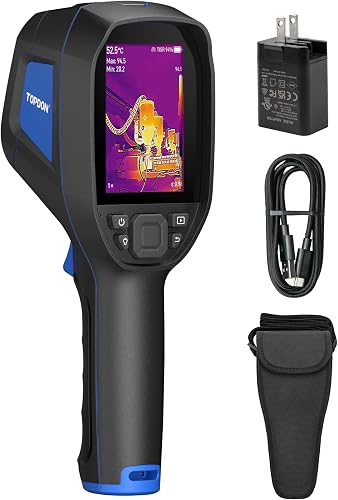

TOPDON TC004 vs TC004 Mini: what changes your buying decision?
The main choice is detail and documentation versus carrying comfort. Start with the job you'll repeat most often, then decide which features support it.
A homeowner checking rooms at the start of the heating season has different needs from someone documenting several inspection areas each day. The first buyer can focus on broad patterns; the second needs images that remain useful during later review.
Neither camera identifies a fault simply by showing a bright patch. Your job is to compare similar surfaces, recognize unusual patterns and decide what needs a closer check.
TOPDON TC004 vs TC004 Mini: who should buy each?
Buy the TC004 if you regularly need to separate nearby warm areas, review images on the camera or prepare records for someone else. Its stronger capture and file-handling features fit a repeatable inspection routine.
Buy the TC004 Mini if you want a camera you can carry between rooms without making weight the focus of the job. It suits periodic checks where finding the general location of an unusual pattern is the first goal.
Skip the larger model if you rarely save images and have no clear use for its reporting features. Skip the Mini if distinguishing small targets or transferring files to a phone is central to your work.
If you're still deciding between handheld and phone-connected cameras, our thermal camera buyer's guide explains where each format fits.
Which camera captures more useful detail?
The TC004 captures more native thermal detail, making it the stronger choice for small targets and nearby temperature patterns. Native resolution matters more than the enhanced image size when comparing these cameras.
The TC004 starts at 256 x 192 infrared resolution and uses TISR to enhance images up to 512 x 384. The Mini starts at 128 x 128 and enhances to 240 x 240.
More sensor pixels give you more points across the scene. That helps when you need to tell where one warm area ends and another begins, provided the target fills enough of the image.
Enhancement can make an image easier to view, but it doesn't create additional physical sensor pixels. Avoid choosing either camera solely because the larger enhanced number sounds impressive.
Distance matters, too: a small target occupies fewer pixels as you move away. Move closer only where access is safe, hold the camera steady and capture the area from a useful angle.
The Mini is a reasonable fit for broad wall or floor patterns, while the TC004 gives you more detail to work with. Our guide to thermal camera resolution, range and price explains those trade-offs, and our TOPDON TC004 review covers that model in more depth.
Is the TC004's screen useful during an inspection?
The TC004's 3.5 in display is useful if you want to assess an image while standing at the target. Buy it for on-camera review when that is a regular part of your routine.
For example, you may want to pause at a wall, compare neighboring areas and decide where to take a closer image. A readable view matters more in that moment than storage you won't use.
The TC004 also has a red laser pointer that indicates the measurement area. Use it to help match the thermal view to the physical target, without assuming the visible dot describes every part of the temperature measurement.
Its integrated LED light helps you see the surrounding work area in dark or confined spaces. Keep the laser away from eyes and follow TOPDON's instructions for both features.
Color choice can change how obvious a pattern looks without changing the underlying scene. Learn how to separate color from temperature with our guide to reading thermal images.
Which is easier to carry through a house?
The Mini is the better carry-first choice, weighing 1.03 lb compared with 2.11 lb for the TC004. That difference matters when you repeatedly raise the camera or carry other tools.
Think beyond the walk from your vehicle to the door. Scanning ceilings, moving between floors and stopping to make notes all involve handling the camera many times.
TOPDON claims 15 hours of runtime for the Mini, which also offers automatic shut-off after 5, 10 or 20 minutes. Pick a shut-off interval that saves power without interrupting your normal pauses.
Don't plan a critical job around the full claimed runtime. Start charged, check the battery before moving to another area and leave time to recharge between longer sessions.
Both models have IP54 protection, and TOPDON claims 2-meter drop resistance for each. Treat those as protection against mishaps: keep the camera dry where practical and secure it before moving through awkward access points.
Which model makes saving and sharing easier?
The TC004 has the clearer documentation workflow, with 64GB of built-in storage and Wi-Fi transfer to the TopInfrared mobile app. It supports saving images and videos, then moving files for analysis and reports.
The Mini has 512MB of storage, which TOPDON says holds up to 8,000 photos. That is useful capacity for reference shots, but the photo count alone doesn't answer how you'll retrieve and organize them.
Confirm the Mini's export options with TOPDON before buying it for a workflow that depends on phone sharing. Choose the TC004 when its stated Wi-Fi route meets that need.
Good records need context as well as a thermal image. Note the room, surface, date and operating conditions so a later reader knows what the image shows.
Capture a wider view before a close view, and keep a matching ordinary photo separately if it helps identify the location. Name or group exported files by area rather than leaving a long sequence of unexplained images.
Back up useful files after each job before removing them from the camera. More storage gives you room to work, but an organized archive is what makes a finding easy to revisit.
Do temperature range and alerts change the choice?
The TC004 is the choice for a higher temperature ceiling; the Mini adds useful preset alerts for repeated checks. Most household buyers should decide on detail and workflow before maximum range.
The TC004 measures from -4°F to 1022°F, while the Mini covers -4°F to 842°F. Choose a range that covers the intended surface, with room for the conditions you expect.
TOPDON gives the Mini an accuracy specification of ±3.6°F/2%. Resolution, measurement range and accuracy describe different things, so don't use one as a shortcut for judging the others.
The Mini marks the highest, lowest and center temperature spots. It also shows an on-screen warning and automatically saves a photo when a preset temperature limit is exceeded.
Set an alert around a meaningful task rather than choosing an arbitrary number. A sunlit surface or a reflection can cross a threshold without proving that anything is wrong.
The Mini offers White Hot, Black Hot, Iron, Rainbow and Red Hot palettes, plus a 25Hz refresh rate. Pick a palette you can read clearly, then pause before saving the image so movement doesn't distract from the pattern.
How should you set up either camera for the first scan?
Start with a charged camera, the correct units and a familiar target. Learn the controls before approaching a surface where access, heat or electricity creates a hazard.
For the Mini, a charging cable is included but a charging head is not. Download its electronic manual using the QR code on the package before you put the packaging away.
Read the manual for charging, image capture, measurement settings and file handling. If your first job needs image sharing, work through that process before collecting a large batch of photos.
Choose a familiar surface with an easy-to-recognize temperature pattern, such as a room radiator viewed from a safe distance. Practice finding the same physical area on the screen and saving an image you can identify later.
Check any available emissivity settings against the material guidance in the manual. Shiny metal can reflect heat from other objects, so a number on that surface may be misleading.
For insulation checks, plan the scan when indoor and outdoor temperatures differ enough to reveal a useful pattern. Our guide to finding drafts and insulation gaps explains how conditions affect the result.
How do you get useful results during home checks?
Use either camera to find patterns that deserve follow-up, then confirm the cause with the right method. A thermal camera shows surface temperature differences rather than a direct view of hidden damage.
Compare like with like: similar wall areas, neighboring floor sections or equipment under comparable operating conditions. A single bright spot is less useful than a clear difference between surfaces that should behave similarly.
For heating checks, note whether the system is running and give it time to establish a pattern. Record the conditions so you can make a fair comparison on a later visit.
For a suspected leak, treat a cool patch as a clue, not proof of moisture. Airflow, insulation differences and recent surface cooling can create patterns that need another method to explain.
Avoid drawing conclusions from surfaces affected by direct sunlight, reflections or a recent change in heating. Recheck under steadier conditions before deciding that a building defect is present.
Keep electrical checks to safely accessible surfaces, and leave panel opening or energized work to a qualified person. A normal-looking thermal image cannot guarantee electrical safety.
Our guide to using a thermal camera at home covers scanning technique. For broader camera selection, see our home inspection thermal camera guide.
What mistakes should you avoid with either TOPDON?
Avoid chasing colors without checking the scene. A useful image needs a known location, a clear target and a sensible comparison.
One common mistake is standing too far away, then enlarging the saved image to inspect a tiny feature. Enlarging the picture cannot recover thermal detail the sensor never captured.
Another is treating the laser pointer as a precise outline of the measurement area. Match the target to the whole thermal view and follow the camera's distance guidance.
Don't compare colors across separate images without checking their temperature scales. A camera can map a different range of temperatures to the same colors as the scene changes.
Alerts need the same care: an automatic photo records a threshold crossing, not a diagnosis. Review the target and conditions before deciding what action to take.
Avoid making repairs based only on an isolated image. Use the thermal finding to choose the next check, such as a moisture measurement, closer visual inspection or professional assessment.
How should you care for the camera between jobs?
Protect the lens, charging connection and saved records after each session. Good storage habits help keep the camera ready for the next useful comparison.
Follow the manual's cleaning method for the lens, and avoid rubbing dust across it with clothing or a rough cloth. Keep solvents and general household cleaners away unless TOPDON specifically allows them.
Dry the exterior before storage and let a damp camera air out in a suitable place. IP54 protection does not make either model suitable for immersion or pressure washing.
Follow the charging and storage temperature limits in the manual rather than assuming a thermal camera can tolerate the temperatures it measures. Avoid leaving it in a vehicle where heat or cold can build up.
Before the next job, check charge, available storage and whether the last set of files was backed up. That short routine is more useful than discovering a missing image after the conditions have changed.
Is the bigger TOPDON TC004 worth it for you?
In the TOPDON TC004 vs TC004 Mini decision, buy the bigger camera when detail and documentation are recurring needs. Choose the Mini when routine home scans and comfortable carrying are the priorities.
For a buyer who saves close views, reviews findings on the camera and prepares reports, the TC004's extra capabilities serve a clear purpose. For occasional room-by-room checks, the Mini is the more focused fit.
Before ordering, name the hardest task you expect to repeat and how you'll use the saved image afterward. If the Mini fits that task, our TC004 Mini review is the next useful read.
Frequently asked questions
Which is better, the TOPDON TC004 or TC004 Mini?
Choose the TC004 for finer image detail and a workflow built around saved images and reports; choose the Mini for lighter carry and periodic home checks. The right choice comes down to whether documenting small areas or carrying the camera comfortably matters more in your routine.
Does the TOPDON TC004 have better resolution than the Mini?
Yes, the TC004 starts at 256 x 192 infrared resolution and enhances images up to 512 x 384 with TISR; the Mini starts at 128 x 128 and enhances to 240 x 240. Compare the native figures first, because image enhancement does not add physical sensor pixels.
Which TOPDON camera is easier to carry?
The TC004 Mini is lighter at 1.03 lb, compared with 2.11 lb for the TC004; that makes it the more practical choice when carrying weight is your main concern. Also think about how often you'll raise the camera toward ceilings or carry it alongside other tools.
Can the TC004 Mini transfer images to a phone?
Confirm the Mini's phone-transfer options with TOPDON if sharing images is essential to your work; it stores photos internally, but that does not tell you how you can export them. The TC004 has Wi-Fi transfer to the TopInfrared mobile app, making it the clearer choice for that workflow.
Which camera measures higher temperatures?
The TC004 covers -4°F to 1022°F, while the Mini covers -4°F to 842°F; choose the TC004 if your task needs the higher ceiling. Range alone does not guarantee measurement accuracy, and a thermal reading cannot confirm that equipment is safe to touch or work on.


