TOPDON TC004 Review: Worth It? (October 2026)
The TOPDON TC004 suits regular home and maintenance inspections where you want a separate screen and onboard storage. Choose a phone-connected alternative for lighter carrying, visible-light views or close-up circuit board work.
On this page (8 sections)
- What does the TOPDON TC004 offer?
- Is the TC004 useful for home inspections?
- How do storage and Wi-Fi affect daily use?
- How does the TC004 compare with phone-connected cameras?
- Which features should decide your purchase?
- How should you set up and use the TC004?
- What mistakes and care problems should you avoid?
- Is the TOPDON TC004 worth choosing?
The TOPDON TC004 is a good fit for regular home and maintenance inspections when you want to scan without attaching a camera to your phone. Its main advantage is a separate screen and onboard file storage, rather than a higher native resolution than the phone cameras here.
Choose it for room-to-room checks and a scan-now, organize-later routine. For a smaller alternative, read the TOPDON TC004 Mini review, or compare the best thermal cameras for iPhone if you'd rather use your phone.
What does the TOPDON TC004 offer?
The TC004 puts viewing, recording and target location into one handheld tool. Its 3.5-inch display and 64GB of built-in storage let you inspect a property without keeping a phone connected.
TOPDON TC004 Handheld
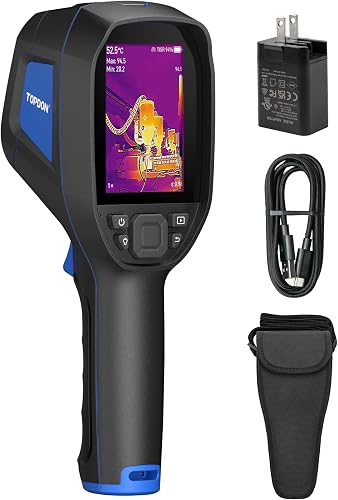
- 3.5-inch display
- 256 × 192 infrared resolution with TISR up to 512 × 384
- 64GB built-in storage
- Wi-Fi file transfer
Choose this handheld for repeated property checks when you want to scan and save files without connecting a phone. Wi-Fi transfer supports later analysis and reports in TopInfrared.
Pros
- Own display for viewing scans
- Onboard image and video storage
- Red laser pointer helps locate the measurement area
- IP54 protection and 2-meter drop resistance
Cons
- Bulkier to carry than a small phone accessory
- Wireless transfer and mobile reporting use the TopInfrared app
The red laser pointer helps match the measurement area to the object in front of you. That's useful around rows of pipes or similar-looking parts, where a thermal image can be harder to place than an ordinary photo.
An integrated LED light helps you see in dark or confined areas. It lights the workspace; thermal imaging itself detects emitted infrared energy and doesn't need visible light to show heat patterns.
TOPDON specifies IP54 protection against dust and splashes, plus 2-meter drop resistance. Those features suit routine field work, but the camera still needs careful handling around water, grit and ladders.
Skip the TC004 if carrying a separate tool would stop you from using it. A small phone accessory makes more sense for someone who wants occasional checks without adding another handheld device to the bag.
What the TOPDON TC004 resolution figure means
The TC004 has 256 × 192 native infrared resolution, enhanced by TISR up to 512 × 384. The higher figure describes processed images, not a detector with more physical sensing points.
All 4 cameras here start with the same native pixel count. That makes screen layout, target identification, focus and phone dependence more useful buying differences than the enhanced resolution number alone.
Tiny objects still need enough detector pixels across them to show a useful pattern. Digital enlargement doesn't recover detail that the sensor never captured, so don't choose a camera by zoom or enhanced output alone.
Our guide to choosing a thermal camera explains how resolution and inspection distance work together.
Is the TC004 useful for home inspections?
The TC004 is useful for finding temperature patterns that deserve a closer look, including cold areas near windows, uneven wall temperatures and warm equipment surfaces. It helps narrow a search before you investigate the cause.
For insulation checks, compare similar sections of the same wall or ceiling. A repeating pattern along framing can mean something different from a single cold patch beside a window.
Scan when indoor and outdoor temperatures differ enough to create a useful contrast. Direct sunlight, recent heating changes and moving air can affect surfaces, so note those conditions before drawing conclusions.
Moisture can also change surface temperatures, but a thermal camera doesn't measure moisture content. Check a suspicious area with an appropriate moisture meter or a qualified inspection before opening a wall.
Our guide to finding drafts and insulation gaps with a thermal camera covers those building checks. The home thermal camera buyer's guide helps match the camera format to your wider inspection needs.
How do storage and Wi-Fi affect daily use?
Onboard storage suits scanning first and sorting evidence later. The TC004 saves images and videos on the camera, then uses Wi-Fi to transfer files to the TopInfrared mobile app for analysis and reports.
That separation helps when you're moving through several rooms and don't want messages or other phone tasks interrupting the inspection. You can finish a planned route before reviewing the saved files.
Build a simple naming habit before the first job. Record the room, wall or piece of equipment, and take an ordinary reference photo with your phone so you can relocate the thermal pattern.
Transfer important files before clearing space, and confirm that the copies open correctly. Keep the original capture as well as any marked-up version, since a cropped image may leave out useful context.
If you want every capture to appear directly on your phone, a connected camera offers a shorter route. Choose the TC004 because you prefer its separate capture process, rather than assuming Wi-Fi removes every file-management step.
How does the TC004 compare with phone-connected cameras?
Choose the TC004 for a separate inspection tool; choose a phone camera for compact carrying or a feature that better matches your targets. The alternatives below solve different problems despite their similar native resolution.
| Camera | Main reason to choose it | Main reason to skip it |
|---|---|---|
| TOPDON TC004 Handheld | Separate screen and onboard storage | You want a pocket-sized phone accessory |
| TOPDON TC002C Duo | Occasional scans with a compatible USB-C device | Your device or operating system isn't supported |
| TOPDON TC001 Max | Visible-light detail alongside thermal imaging | You want to inspect without a connected device |
| Thermal Master P3 | Adjustable focus for tiny components | You want fewer lens adjustments during room scans |
The TC004 vs TC004 Mini comparison focuses on those handheld choices. For another phone-camera comparison, see TOPDON vs FLIR phone thermal cameras.
TOPDON TC001 Max: choose it to identify the heated part
The TC001 Max suits buyers who need visible-light detail alongside a thermal pattern. That extra view helps connect a hot area to a particular component, connection or piece of equipment.
Its TopInfrared and TopView app options support photos, video, temperature graphs and 3D temperature analysis. Those tools fit someone who wants to review changes and document a finding on a connected device.
Included USB-C and Lightning adapters broaden the connector options, and the camera doesn't need separate battery charging. Confirm support for your exact device and operating system before relying on it for work.
Skip it if keeping your phone attached would make the inspection awkward. Visible-light detail helps locate a target, but it doesn't turn a heat pattern into a confirmed fault.
TOPDON TC002C Duo: choose it for a compatible USB-C setup
The TC002C Duo suits occasional home checks through a USB-C phone or tablet. Its compact body makes sense when carrying a separate handheld camera feels excessive.
Its 25Hz refresh rate supports a fluid moving view, while TopInfrared handles capture and review. A compatible tablet may appeal if you prefer a larger viewing area and don't mind holding the larger device.
Compatibility is the deciding check: TOPDON excludes Android 16 and Mac devices. Don't assume a USB-C connector alone means the camera will work with every device you own.
Skip this model if you need visible-light imaging or close-up manual focus. The Max and P3 address those needs more directly.
Thermal Master P3: choose it for close-up electronics
The P3 suits circuit board inspections where lens focus matters. Its manual-focus lens supports macro work down to 8mm, giving it a distinct purpose beside the general inspection models.
The extension cable lets you position the camera separately from the phone. That helps when the phone body would block your view or make the inspection angle awkward.
Thermal Master specifies sensitivity of ≤35mK, and the app includes temperature alarms and report generation. Low thermal sensitivity figures describe the ability to distinguish small differences, not a promise of equally small absolute measurement error.
Skip the P3 if you mainly scan rooms and don't want to refocus as distances change. Its macro feature earns its place for small targets; it isn't a reason for every homeowner to choose it.
Which features should decide your purchase?
Start with target size, device dependence and documentation needs. These choices affect how easily you can complete the job, while several headline specifications overlap across these cameras.
Match the camera to the size of the target
A broad cold patch on a ceiling and a tiny hot component on a board need different approaches. For small components, focus and working distance deserve more attention than onboard storage.
For general property checks, a clear way to view, save and relocate findings is often more useful. The TC004's design fits that routine without asking you to build the inspection around a phone.
Don't buy extra temperature range without a reason
The TC004, Duo and Max cover -4°F to 1,022°F; the P3 extends to 1,112°F. That difference shouldn't drive a purchase for ordinary wall, window and insulation checks.
A camera's measurement range also doesn't guarantee a safe working distance from hot equipment. Choose access and protective measures for the actual task, rather than moving closer because the camera can display the temperature.
Separate sensitivity from accuracy
Sensitivity describes small temperature differences the camera can distinguish. Accuracy describes how close a measurement may be to the actual surface temperature under suitable conditions.
For comparisons, keep the material, viewing angle and distance consistent. A precise-looking number on a reflective surface can still mislead you.
How should you set up and use the TC004?
Start with a known target and a repeatable scan routine. Charge the camera, check that files save correctly and arrange the app transfer before depending on it during an inspection.
- Choose a simple reference. View a room-temperature wall and a warmer object, keeping clear of dangerous surfaces.
- Check measurement settings. Use the correct units and an emissivity setting suited to the material, following the camera's instructions.
- Start with a wide view. Find the overall pattern before moving closer to a small area.
- Compare like surfaces. Compare painted drywall with painted drywall, rather than with shiny metal or glass.
- Save context with the finding. Record the location and conditions so the image remains useful later.
Emissivity describes how well a surface emits infrared energy. Shiny metal can reflect heat from you or nearby equipment, so change your viewing angle before accepting an apparent hot spot.
Keep the laser away from eyes, people and animals. Treat it as a location aid, rather than assuming every visible part inside the laser-marked area has the same temperature.
For a longer inspection routine, follow our guide to using a thermal imaging camera at home.
What mistakes and care problems should you avoid?
Avoid judging a fault from color alone, scanning through unsuitable surfaces or treating a protection rating as permission for rough handling. A useful image needs context, and the camera still needs basic care.
Automatic color scales can make a small temperature difference look dramatic. Read the scale and compare values before deciding that a bright patch indicates severe overheating.
Different images may use different scale limits, so matching colors don't always mean matching temperatures. Our guide to reading thermal image colors explains that distinction.
A thermal camera shows surface patterns rather than seeing through walls. Standard window glass also doesn't provide a clear thermal view of the scene beyond it; the guide to how thermal imaging cameras work explains why.
Don't open electrical panels or approach exposed energized parts just to improve an image. A normal-looking scan doesn't mean equipment is safe to touch.
Keep the lens free of fingerprints and use cleaning methods intended for its optical surface. Avoid abrasive cloths and household cleaners unless the care instructions allow them.
Dry the camera before storage and keep the lens protected during transport. IP54 covers dust and splashes, not immersion, and drop resistance doesn't make repeated impacts harmless.
Is the TOPDON TC004 worth choosing?
Buy the TOPDON TC004 if regular property checks justify a separate camera and you want to keep scanning independent of your phone. Before ordering, decide where you'll store the tool and how you'll label and transfer each inspection's files.
Choose the TC001 Max when identifying the heated part needs visible-light detail. Choose the TC002C Duo for occasional scans on a supported USB-C device, or the P3 when close-up electronics work makes manual focus essential.
If you're still deciding between handheld and phone-connected designs, use the thermal camera buyer's guide to narrow the choice around your actual inspection tasks.
Frequently asked questions
Is the TOPDON TC004 a standalone thermal camera?
Yes, the TC004 has its own screen and onboard storage, so a connected phone isn't needed to view and save scans. Wi-Fi transfers files to the TopInfrared mobile app for further analysis and reports, letting you keep scanning and file organization as separate tasks.
What is the TOPDON TC004 resolution?
The TC004 has a native infrared resolution of 256 × 192, with TISR enhancement up to 512 × 384. The enhanced figure describes processed output, not additional detector pixels; compare native resolution first, then consider image processing and the features that help you identify your inspection target.
Can the TOPDON TC004 find insulation gaps?
The TC004 can reveal surface temperature patterns that suggest an insulation gap or air leak. Scan with a useful indoor-to-outdoor temperature difference and compare similar surfaces; a cold patch alone doesn't confirm missing insulation, so check for drafts, moisture and material changes before deciding on repairs.
Should I choose the TC004 or a phone thermal camera?
Choose the TC004 for repeated inspections where a separate display and onboard file storage simplify the job. Pick a phone camera for compact carrying or a specific feature such as visible-light imaging or macro focus; confirm the phone model, connector and operating system before choosing an accessory.


