9 Best Thermal Imaging Camera (October 2026)
The best thermal imaging cameras include the TOPDON TC004 Mini for everyday home checks, the TOPDON TC001 Max for phone-based troubleshooting, and the FLIR ONE Pro for guided iPhone inspections.
On this page (7 sections)
- Which thermal imaging cameras suit different jobs?
- The best thermal imaging cameras by use
- How do you choose the best thermal imaging camera?
- How should you set up your first inspection?
- Which mistakes lead to misleading thermal images?
- How do you care for a thermal camera?
- Which thermal imaging camera should you choose?
The best thermal imaging camera for everyday home checks is the TOPDON TC004 Mini, thanks to its standalone design, temperature alerts and automatic photo capture. Choose the TOPDON TC001 Max for phone-based analysis, or the TOPDON TC004 Handheld for a larger built-in screen and video records.
Start with the job you need to do: scan broad wall patterns, examine small components or document recurring problems. Those tasks place different demands on sensor detail, controls and file handling.
For the basics, read our complete thermal camera buyer's guide. Phone users can compare the best thermal camera for iPhone, while our explanation of how thermal imaging cameras work covers what these tools actually measure.
Our picks at a glance
-
1

-
2

-
3
Which thermal imaging cameras suit different jobs?
Choose the TC004 Mini for routine home checks, a phone attachment for app-based work, or a larger handheld for frequent inspections and records. Small electrical targets deserve more attention to native resolution than a broad scan of a wall.
EarnestEave compared sensor resolution, connection requirements, measurement controls and documentation tools. The order favors a useful everyday home camera first, then options for more specific workflows.
| Product | Best for | Enhanced resolution | Temperature range | Format | Our score |
|---|---|---|---|---|---|
| TOPDON TC004 Mini | everyday home checks | 240 x 240 TISR | -4°F to 842°F | Handheld | 9.2 |
| TOPDON TC001 Max | phone-based troubleshooting | 512 x 384 TISR | -4°F to 1,022°F | Phone attachment | 8.6 |
| FLIR ONE Pro | guided iPhone inspections | 480 x 360 | Phone attachment | 8.5 | |
| TOPDON TC004 Handheld | frequent property inspections | 512 x 384 TISR | Handheld | 8.4 | |
| TOPDON TC002C Duo | mixed-device households | 512 x 384 TISR | -4°F to 1,022°F | USB-C phone attachment | 8.3 |
| Thermal Master Thor002 | detailed field reporting | 512 x 384 X³ | -4°F to 1,022°F | Handheld | 8.2 |
| HSFTOOLS HF96 Thermal Camera | assisted insulation checks | 240 x 240 | -4°F to 1,022°F | Handheld | 8.1 |
| Foxwell RT280 Thermal Camera | Windows report workflows | 240 x 180 TISR | -4°F to 1,022°F | Handheld | 7.8 |
| Klein Tools TI223 Thermal Imager | time-lapse phone records | -4°F to 752°F | Phone attachment | 7.1 |
The best thermal imaging cameras by use
The best thermal imaging camera matches your inspection routine as well as your target. Each pick below has a clear buyer, along with a reason to choose another model.
TOPDON TC004 Mini
- 128 x 128 thermal imaging enhanced to 240 x 240
- 15-hour runtime
- Temperature alerts and automatic photo capture
- 512MB storage
A compact standalone camera for checking heating patterns, drafts and unusual hot spots. Automatic photo capture helps record readings that cross your chosen temperature limit.
Pros
- Temperature alerts can trigger photo capture
- Stores up to 8,000 photos
- IP54 protection and 2 m drop resistance
Cons
- Charging head is not included
- Lower native resolution than several alternatives
The TOPDON TC004 Mini suits homeowners who want to check heating patterns and suspicious hot or cold areas without connecting a phone. Its 128 x 128 native thermal image is enhanced to 240 x 240 with TISR.
Automatic photo capture is its most useful distinction for repeat checks. Set a temperature limit around the condition you're watching, and the camera can save a photo when that threshold is crossed.
TOPDON claims 15 hours of runtime, which suits moving between rooms without frequent charging breaks. Its compact format also makes sense for a household tool drawer rather than a dedicated inspection kit.
Choose it for broad surface patterns and simple photo records. Skip it if your main task involves small, closely spaced components, where a higher-native-resolution camera gives you more samples across the target.
A charging cable comes with it, but a charging head doesn't. Download the electronic manual before your first inspection so you can set alerts and understand the controls.
TOPDON TC001 Max
- 256 x 192 thermal resolution enhanced to 512 x 384
- Dual thermal and visible-light lenses
- USB-C and Lightning adapters
- Photo and video capture
Dual lenses add visible detail to thermal images, while app graphs help you follow temperature changes. Included adapters support connections to compatible USB-C and Lightning devices.
Pros
- No separate battery or wireless pairing required
- Photo, video, graphs and 3D temperature analysis
- Supports compatible Windows devices
Cons
- Device and software compatibility need checking
- Occupies the connected device's port during use
The TOPDON TC001 Max is the strongest fit here for buyers who want thermal analysis on a compatible phone. Its dual thermal and visible-light lenses help connect a heat pattern to the object in front of you.
The native sensor is 256 x 192, enhanced to 512 x 384 with TISR. App tools include video, temperature graphs and 3D analysis, useful when a single image doesn't explain how a component warms or cools.
It connects by USB and includes USB-C and Lightning adapters. There's no separate camera battery to charge, though your connected device still needs enough power for the session.
Choose it for troubleshooting that moves from image capture to app-based review. Skip it if you want a dedicated screen or need your phone free for calls and notes throughout the inspection.
Confirm the exact device and software combination before buying. For a separate inspection tool, compare the best thermal camera for home inspection.
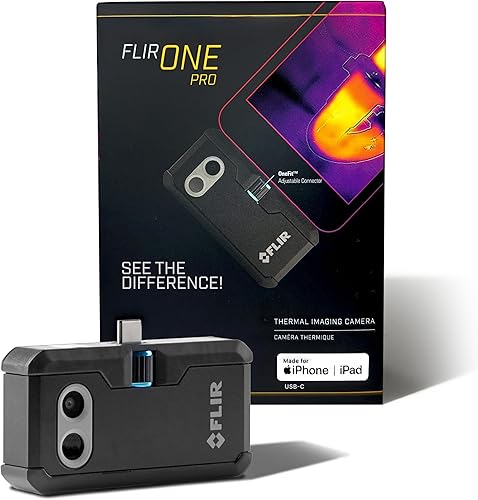
FLIR ONE Pro
- 160 x 120 native IR, enhanced to 480 x 360
- MSX visible detail overlay
- Inspection guides in the FLIR ONE app
- USB-C iPhone compatibility
Step-by-step app guides suit iPhone users who want help planning common inspections. MSX adds visible outlines to help identify the surfaces shown in a thermal image.
Pros
- In-app inspection guidance
- MSX adds visible edge detail
- Rated for a 1.5 m drop
Cons
- This version requires a USB-C iPhone
- Accuracy specification has defined camera and scene conditions
The FLIR ONE Pro suits USB-C iPhone users who want step-by-step inspection guidance rather than only a heat image. Guides in the FLIR ONE app help structure checks for common household faults.
MSX adds visible edge and outline detail to thermal readings, making it easier to identify the area shown. Its native 160 x 120 infrared image is enhanced to 480 x 360 with VividIR.
Choose this version if you have an iPhone 15 or newer with USB-C and value guided work. Skip it for Android, Lightning iPhones or a workflow that needs a standalone camera.
Pay attention to measurement conditions if absolute temperatures drive your decision. FLIR specifies ±3°C or ±5% accuracy with the camera at 15°C to 35°C and the scene at 5°C to 120°C.
Those conditions describe the accuracy specification, rather than a universal promise for every environment. Our FLIR ONE Pro review explains its phone-focused design in more detail.
TOPDON TC004 Handheld
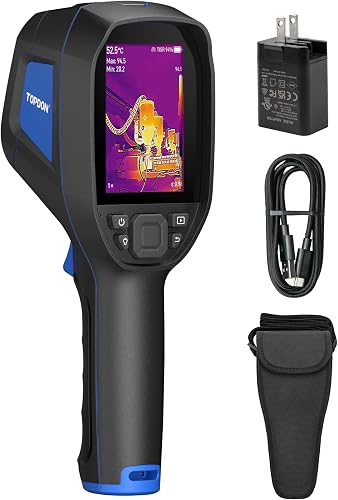
- 256 x 192 IR enhanced to 512 x 384
- 3.5 in display
- 64GB built-in storage
- Wi-Fi file transfer
A standalone screen and substantial storage suit repeated inspections with image and video records. Wi-Fi transfer connects those records to the TopInfrared mobile app.
Pros
- Built-in red laser pointer and LED light
- 64GB storage for images and videos
- IP54 protection and 2 m drop resistance
Cons
- Adds a separate device to your tool bag
- Mobile file transfer uses the TopInfrared app
The TOPDON TC004 Handheld suits frequent property checks where you want to scan, capture and move on without attaching a phone. Its 3.5-inch screen and 64GB storage support a dedicated inspection routine.
The thermal sensor captures 256 x 192 images, enhanced to 512 x 384 with TISR. That makes it a stronger choice than the Mini when native detail matters alongside the standalone format.
A laser pointer helps locate the target, and an LED light helps you see the surrounding space. Wi-Fi transfer to the TopInfrared app supports later analysis and reporting.
Choose it if you regularly collect images and video across several rooms or pieces of equipment. Skip it if you only want an occasional household scan and would leave a larger tool behind.
Before a long inspection, establish a file-naming routine so records from different rooms don't blur together. For the simpler alternative, read the TOPDON TC004 Mini review.
TOPDON TC002C Duo

- 256 x 192 thermal imaging enhanced to 512 x 384
- Supported USB-C iOS, Android and Windows devices
- Photo and video recording
- Temperature limits and waveform display
A small attachment for households or teams with compatible USB-C devices across supported platforms. Check operating-system support, especially for Android 16.
Pros
- Compact 30 g attachment
- Photo and video recording
- Waveform display for temperature changes
Cons
- TOPDON identifies Android 16 and Mac as unsupported
- USB-C alone does not guarantee software compatibility
The TOPDON TC002C Duo suits buyers who want one small attachment for supported USB-C devices across several platforms. Its 30 g camera body is easy to include in a compact kit.
It has a 256 x 192 thermal sensor with 512 x 384 TISR enhancement. Photo and video capture, temperature limits and a waveform display support checks where you want to follow changes rather than save only one snapshot.
Choose it for a household or team that already uses compatible phones and tablets. Check each intended device separately instead of assuming the connector guarantees support.
TOPDON identifies Mac and Android 16 as unsupported, so skip it if either is essential to your workflow. That restriction matters more than the camera's small size or image enhancement.
The TC001 Max is the more relevant comparison if visible-light detail and its adapter options appeal to you. The Duo makes sense when supported USB-C use and compact carry are the priorities.
Thermal Master Thor002

- 256 x 192 thermal imaging enhanced to 512 x 384
- 3.5 in IPS display
- Photo, video and voice notes
- Wi-Fi pairing and USB PC analysis
Voice notes, QR code file management and six-point measurement suit inspections that need clear records. USB PC analysis and wireless pairing provide several ways to review findings.
Pros
- Measures six points at once
- 32GB storage
- IP54 protection and 2 m drop resistance
Cons
- More reporting tools than occasional home checks require
- Digital zoom does not add native sensor detail
The Thermal Master Thor002 suits inspectors who need to explain findings after leaving the site. Voice notes and QR code file management help keep observations connected to their records.
It combines a 3.5-inch IPS display with a visible-light camera and 256 x 192 native thermal imaging, enhanced to 512 x 384. Six measurement points include the center, hottest, coldest and 3 user-defined spots.
That layout suits comparing several areas within one scene, such as sections of a heating surface. USB PC analysis and Wi-Fi pairing offer routes for reviewing the captured information later.
Choose it when detailed documentation is part of the job, rather than an occasional extra. Skip it if you mainly need quick household photos and won't use notes or multiple measurement points.
Thermal Master claims up to 10.5 hours of runtime and supports 18W fast charging. Its digital zoom helps enlarge the view, but moving closer within safe working limits gives the sensor more useful target detail.
HSFTOOLS HF96 Thermal Camera

- Thermal images enhanced to 240 x 240
- AI scene recognition
- Temperature alarms and laser pointer
- Windows analysis software
Scene recognition offers help locating patterns associated with insulation gaps and water leaks. Manual level and span controls let you narrow the displayed temperature band.
Pros
- HSFTOOLS claims up to 11 hours of operation
- 4GB storage for images and video
- Tripod mounting and Windows analysis tools
Cons
- Scene recognition requires a firmware update
- Does not measure moisture or confirm leaks
The HSFTOOLS HF96 suits homeowners who want help recognizing possible insulation and leak patterns. HSFTOOLS says IntellFault scene recognition can highlight likely areas to investigate.
That assistance doesn't measure moisture or establish why a patch looks different. Use it to choose the next inspection area, then verify the cause through another suitable method.
The camera enhances thermal images to 240 x 240 and offers manual level and span controls. Narrowing that displayed temperature band can make a subtle wall pattern easier to see when a much hotter object dominates the scene.
Choose it if assisted scene recognition and adjustable display controls fit your approach. Skip it if you expect an automatic leak diagnosis or need direct moisture readings.
The scene feature requires a firmware update and selection of “Scene” in the settings. Set that up before inspecting, and use the tripod mount when comparing the same view over time.
Foxwell RT280 Thermal Camera

- 120 x 90 thermal imaging enhanced to 240 x 180
- 2.8 in LCD screen
- Windows software with 2D and 3D analysis
- 8GB storage
Windows software supports point, line and area analysis plus automatic report generation. This suits buyers who plan to review saved inspection images at a desk.
Pros
- 8GB storage for images and videos
- Laser pointer and LED light
- IP54 protection and 6.6 ft drop resistance
Cons
- Analysis software does not support Mac
- Lower native resolution than several cameras above
The Foxwell RT280 Thermal Camera suits buyers who want to turn saved images into Windows-based reports. Its software supports point, line and area temperature analysis, plus 2D and 3D views.
The handheld uses a 120 x 90 native thermal image enhanced to 240 x 180, with a 2.8-inch display. Its 8GB storage holds image and video records for later review.
Choose it when desktop analysis is a regular step in your work. For example, line and area tools can help describe a pattern across a surface instead of reporting only its hottest point.
Skip it if you use a Mac for analysis or need finer native detail for small targets. Report tools can't recover sensor information that wasn't captured in the original scene.
Take an overview image as well as a closer view of each finding. That gives the report context and helps someone else locate the area without guessing from a tight thermal crop.
Klein Tools TI223 Thermal Imager

- 19,200-pixel resolution
- USB-C phone attachment
- Photo, video and time-lapse capture
- Three color palettes
Time-lapse capture suits users who want a record of gradual heating or cooling. Spot, high/low and differential temperature modes cover straightforward comparisons.
Pros
- Fits phone cases up to 1/5 in thick
- Differential temperature readout
- Compact 1.12 oz design
Cons
- Lower maximum temperature than the other picks
- Requires a compatible USB-C iOS or Android device
The Klein Tools TI223 Thermal Imager suits phone users who want time-lapse records of gradual temperature changes. That can be useful for watching a surface warm after heating starts or cool after equipment shuts down.
It provides 19,200-pixel thermal resolution and spot, high/low and differential temperature displays. The differential readout suits comparisons where the gap between temperatures matters more than either number alone.
Choose it if those capture modes meet your needs and you already have a compatible USB-C iOS or Android device. It accommodates phone cases up to 1/5 in thick, though you should still check the physical connection.
Skip it for work requiring temperatures above its 752°F ceiling. Also compare the more detailed analysis tools on the other phone attachments if reports or graphs are central to your routine.
For useful time-lapse footage, keep the camera position and target consistent. A changing angle can introduce reflections that look like a real temperature change.
How do you choose the best thermal imaging camera?
Choose by target size, working distance and workflow, then check measurement range and device support. A broad wall scan and a close view of small components call for different priorities.
What thermal imaging camera resolution should you choose?
Compare native infrared resolution first because it describes the sensor's temperature samples. Enhanced resolution describes the processed image, while screen resolution describes the display.
Image enhancement and visible outlines can make a scene easier to interpret. Neither means every displayed pixel is a separate native infrared measurement.
For walls, floors and heating patterns, broad coverage is useful. For a small connection or component, you need enough thermal samples across that target to distinguish it from its surroundings.
Distance matters because a target occupies fewer pixels as you move away. A wide field of view covers more wall from a tight room but makes small objects appear smaller at the same distance.
Our guide to thermal camera resolution explains how these factors work together.
Should you choose a handheld camera or phone attachment?
Choose a handheld for a separate screen and controls, or an attachment when you want to work within a phone app. Think through where your images will go after capture.
A shared household camera may be easier to manage as a standalone tool. A phone attachment suits someone who prefers keeping capture, notes and sharing on one device.
Check connector type, operating-system support, case clearance and app access before buying an attachment. A matching USB-C port alone doesn't settle compatibility.
Our guide to thermal cameras for home use covers formats, while the guide to using a thermal imaging camera at home helps you plan the actual inspection.
How much do sensitivity, range and accuracy matter?
Prioritize sensitivity for small temperature differences and range for the hottest or coldest surfaces you expect to inspect. Sensitivity describes detecting small changes; accuracy describes how close a temperature reading is to the actual value.
A camera can reveal a useful pattern without measuring absolute temperature to a tiny fraction of a degree. Don't confuse a fine-looking decimal readout with guaranteed precision.
For household insulation checks, a high maximum temperature is rarely the deciding feature. For hotter machinery, confirm the range and measurement conditions before considering storage or extra palettes.
Which recording tools are worth having?
Choose recording tools around the evidence you need to keep. Photos suit stable patterns, video captures changing behavior, and notes preserve the room, operating conditions and reason for concern.
Large storage helps on long jobs, but organized files matter more than capacity for a few home checks. Decide how you'll export records and whether the analysis software works on your computer.
A visible-light image adds location context. It doesn't replace the thermal reading, so save enough information to tell which surface and conditions produced the finding.
How should you set up your first inspection?
Start with a clear question and stable conditions, then compare like surfaces. “Why is this room colder?” gives you a more useful task than collecting colorful images around the house.
Give the temperature pattern time to develop
For insulation checks, work when indoor and outdoor temperatures differ enough to produce a visible pattern. Recent sun, rain or a heating change can complicate what the camera shows.
Avoid judging an exterior wall just after direct sunlight has heated it unevenly. Indoors, note nearby vents, radiators, appliances and furniture that could explain a warm or cold patch.
For heating checks, record whether the system has just started or has been running steadily. Comparisons made at different stages can suggest a fault where there is only a normal warm-up delay.
Set the camera for the surface
Let the camera settle after moving between very different environments, following its instructions. Check units and adjust emissivity where the model allows it.
Emissivity affects how a surface emits infrared energy. Painted walls are generally easier to interpret than shiny metal, which can reflect heat from people and surrounding objects.
Change your angle slightly if a bright spot may be a reflection. If the apparent hot area shifts with your viewpoint, investigate that possibility before treating it as a hot component.
Capture an overview and a useful close view
Scan slowly, locate the unusual pattern and save a wider image that shows its position. Then move closer, where safe, to capture enough detail for a meaningful comparison.
Keep similar surfaces and camera positions in view when comparing results. Record the room, date, operating state and any relevant weather conditions in your notes.
Compare repairs under similar conditions too. A warmer outdoor day or a different heating cycle can change an image even when the repair itself has made no difference.
Which mistakes lead to misleading thermal images?
The biggest mistakes are treating colors as a diagnosis, ignoring reflections and comparing images with different scales. Thermal images show surface patterns that need an explanation.
Assuming red always means a dangerous temperature
Colors represent the selected palette and temperature scale. A red patch may be only slightly warmer than the rest of a cool scene.
Read the numbers and scale before drawing a conclusion. For examples, see what the colors on a thermal camera mean.
Automatic scaling can also make two different scenes look equally dramatic. Use a consistent scale where supported when the purpose is direct visual comparison.
Calling every cold patch a leak
Cold areas can come from airflow, missing insulation, moisture or normal construction details. Confirm the cause before cutting into a surface or planning a repair.
A thermal camera reads surface heat rather than revealing objects inside a wall. Our explanation of whether thermal imaging can see through walls covers that limit.
Using a hot spot as permission to approach equipment
A thermal image doesn't mean electrical equipment is safe to touch or open. Keep the required distance and leave exposed energized equipment to a qualified person.
The laser pointer is an aiming aid, not the full temperature measurement area. Keep it away from eyes and remember that the infrared sensor measures an area rather than an infinitely small dot.
How do you care for a thermal camera?
Protect the infrared lens, connection and stored files so the camera stays ready for the next check. Dust and moisture protection don't make a camera suitable for immersion.
Follow the camera's lens-cleaning instructions instead of using household glass cleaner or rubbing a gritty surface. Carry it in a protective case or pouch that keeps tools away from the lens.
For phone attachments, support the connected camera and avoid using it as a handle. Remove it before putting the phone in a pocket or bag, where sideways force could strain the connection.
Export important records regularly and check battery readiness before a planned inspection. Install supported app or firmware updates ahead of the job so setup doesn't interrupt your work.
Which thermal imaging camera should you choose?
Choose the best thermal imaging camera for the work you'll repeat, rather than the longest feature list. Start with your main target and the device you want to carry.
Pick the TOPDON TC004 Mini for broad household checks and straightforward photo records. Move to the TC004 Handheld when finer native detail, a dedicated screen and video storage justify carrying a larger tool.
Choose the TC001 Max for phone-based analysis, or the FLIR ONE Pro if guided inspections on a compatible iPhone matter most. The TC002C Duo suits supported USB-C devices when its operating-system limits fit your setup.
For reporting, favor the Thor002 for notes and multiple measurement points or the RT280 for Windows analysis. Choose the HF96 for assisted pattern recognition and the TI223 when phone time-lapse is your priority.
Use our thermal camera buyer's guide to check the remaining tradeoffs, then compare the best thermal camera for iPhone if phone compatibility decides your shortlist.
Our top 3 picks at a glance
-
1
-
2
-
3
Frequently asked questions
What is the best thermal imaging camera for home use?
The TOPDON TC004 Mini is our pick for everyday home checks because it works independently of a phone and can save photos when temperatures cross a preset limit. Choose a higher-native-resolution model for smaller targets, or the TOPDON TC004 Handheld when a larger screen and video records matter more.
Are phone thermal cameras as useful as handheld models?
Phone thermal cameras can be just as useful for suitable jobs when their sensor detail and software meet your needs. Attachments make phone-based viewing and sharing convenient, while handheld cameras provide separate controls and a screen; check the exact device, connector and operating system before choosing a phone attachment.
What resolution do I need in a thermal imaging camera?
Broad wall and heating patterns need less detail than small components viewed from the same distance. Compare native thermal resolution first, then consider image enhancement, field of view and working distance; a sharper screen or larger saved image does not mean the infrared sensor captures that many separate temperature samples.
Can a thermal camera find a water leak?
A thermal camera can reveal surface temperature patterns that suggest where to investigate a possible leak, but it cannot confirm moisture or show water through a wall. Check suspicious areas with a moisture meter or another suitable method; cold patches can also come from drafts, shading or differences in construction.
How accurate are thermal imaging cameras?
Accuracy depends on the camera, surface and measurement conditions; a camera may show a useful temperature pattern even when its absolute reading needs correction for emissivity or reflections. Follow the model's instructions, allow it to settle after a temperature change, and compare similar surfaces under similar conditions before drawing conclusions.


