7 Best Thermal Imaging Camera for Wildlife (October 2026)
The best thermal imaging cameras for wildlife and birding include the TOPDON TS004 Thermal Monocular for long outings, the RIX Pocket K2 Thermal Monocular for traveling light, and the GOYOJO G210 Thermal Monocular for stationary wildlife watching.
On this page (9 sections)
- Which thermal imaging camera for wildlife fits your outings?
- How should you choose a wildlife thermal camera?
- What can thermal imaging show through foliage and darkness?
- How should you set up a thermal monocular before an outing?
- How do you find wildlife without losing the subject?
- Which common mistakes make thermal wildlife images harder to read?
- How should you clean and store a wildlife thermal camera?
- How did EarnestEave choose these wildlife monoculars?
- Which thermal imaging camera for wildlife should you choose?
The TOPDON TS004 Thermal Monocular is our top thermal imaging camera for wildlife for long outings, thanks to its battery endurance, manual focus and outdoor protection. Choose the Thermal Master T2 Max for phone-based birding, or the RIX Pocket K3 when native thermal detail is your main concern.
Thermal helps you locate animals before you can see them clearly with ordinary optics. It won't reveal feather colors, see through solid cover or turn every distant warm spot into a clear identification.
Our picks at a glance
-
1
-
2

-
3

- 4
 Best for phone-based birdingCheck it
 - 5
 Check it
AGM Taipan V2 Thermal Monocular
Best for recording wildlife - 6Check it
RIX Pocket K3 Thermal Monocular
Best for detail-focused observers - 7
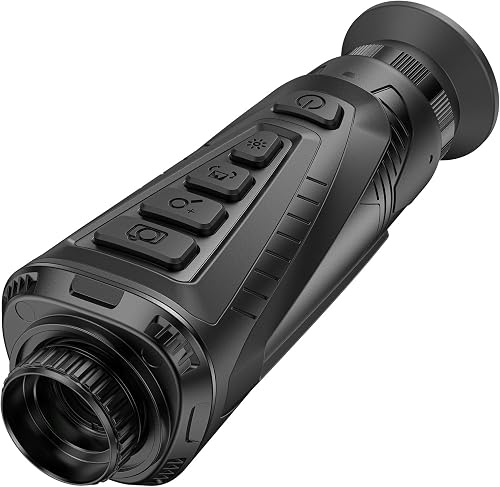 Best for watching field edgesCheck it
Which thermal imaging camera for wildlife fits your outings?
Choose a standalone monocular for quick scans through an eyepiece, or a phone-based model if a shared screen matters more. Then decide whether your main need is longer runtime, easier carry, recording or more thermal detail.
The order below reflects overall wildlife use, but a specialist feature can matter more than the overall score. A birder sharing discoveries with a companion has different needs from someone scanning fields alone for several hours.
| Product | Best for | Native thermal resolution | Refresh rate | Weather protection | Our score |
|---|---|---|---|---|---|
| TOPDON TS004 Thermal Monocular | long outings | 256 x 192 | 50 Hz | IP67 | 8.2 |
| RIX Pocket K2 Thermal Monocular | traveling light | 256 x 192 | 50 Hz | IP67 | 7.1 |
| GOYOJO G210 Thermal Monocular | stationary wildlife watching | 256 x 192 | 25 Hz | IP65 | 7.0 |
| Thermal Master T2 Max | phone-based birding | 256 x 192 | 50 Hz | IP54 | 6.9 |
| AGM Taipan V2 Thermal Monocular | recording wildlife | 256 x 192 | IP67 | 6.8 | |
| RIX Pocket K3 Thermal Monocular | detail-focused observers | 384 x 288 | 50 Hz | IP67 | 6.7 |
| CVLIFE Thermal Monocular | watching field edges | 256 x 192 | 50 Hz | IP65 | 6.6 |
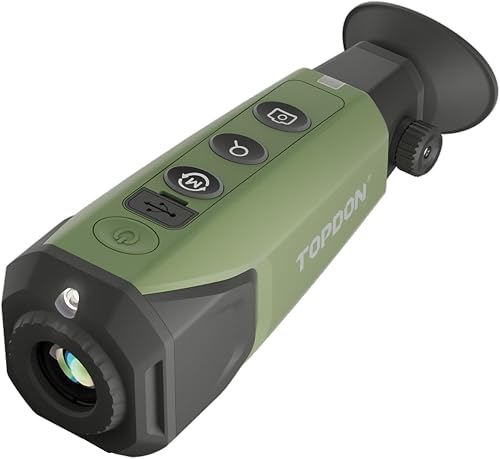
TOPDON TS004 Thermal Monocular
- 256 x 192 IR resolution
- 50 Hz refresh rate
- Up to 11 hours of operation
- IP67 protection
Manual focus and extended claimed runtime suit wildlife watchers who spend hours moving between observation spots. The TopInfrared app adds wireless viewing and image capture.
Pros
- Up to 11 hours of claimed operation
- IP67 protection
- Adjustable manual focus
Cons
- Focus needs attention as viewing distance changes
- Lower native sensor resolution than Pocket K3
The TOPDON TS004 suits observers who want one dedicated device for extended walks and watch sessions. Its 256 x 192 sensor and 50 Hz refresh rate pair thermal detection with smooth scanning, while manual focus lets you adjust for different distances.
TOPDON claims up to 11 hours of operation from the 5000 mAh battery. That gives it the longest stated runtime here, though you should leave a reserve rather than plan an outing around the full claim.
Its IP67 protection and silicone casing suit damp, dusty routes. The TopInfrared app supports wireless viewing and image or video capture with audio, including offline use.
TOPDON claims detection out to 410 m and detail visibility within 100 yd. Use these as separate reference points, since a distant warm shape won't show the same detail as a nearby animal.
Buy it for long outings where endurance matters more than the highest sensor resolution. Skip it if you want fixed-focus simplicity or if recording without a phone is central to your plans.
RIX Pocket K2 Thermal Monocular
- 256 x 192 thermal resolution
- 800 x 600 OLED display
- Electronic image stabilization
- IP67 protection
A compact, 200 g body makes the K2 a practical companion to binoculars. Fixed focus keeps operation simple, and its sliding lens cover stays attached.
Pros
- Compact body
- Electronic image stabilization
- Integrated sliding lens cover
Cons
- No manual focus adjustment
- Lower native sensor resolution than Pocket K3
The RIX Pocket K2 makes sense when your thermal device must share space with binoculars, water and other walking gear. Its body measures 4.9 x 1.8 x 2.9 in and weighs 200 g.
A 256 x 192 sensor feeds an 800 x 600 OLED display, with a 50 Hz refresh rate. Electronic image stabilization reduces the visual effect of small hand movements, and RIX's RET processing enhances the image without changing native sensor resolution.
The fixed-focus lens removes one adjustment during a quick scan. Its 19.4-degree field of view helps you search an area before narrowing attention to a warm shape.
IP67 protection adds reassurance on wet routes, while the integrated sliding lens cover avoids a loose cap to keep track of. Close it before putting the monocular back in your pocket.
Buy it for frequent short scans while walking, especially if you already carry visible-light optics. Skip it if you want to tune focus at different distances or need the greater native detail of the K3.
GOYOJO G210 Thermal Monocular
- 256 x 192 thermal sensor
- 6 color palettes
- 16 GB image storage
- Replaceable batteries
The G210 suits observers scanning slowly from a fixed spot, with several palette choices and storage for images. Replaceable batteries and power-bank support provide options for longer sessions.
Pros
- Six color palettes
- 16 GB image storage
- Replaceable batteries
Cons
- Fixed-focus lens
- Lower refresh rate than the 50 Hz alternatives
The GOYOJO G210 suits observers who scan slowly from a fixed position and want options for saving images and managing power. Its six palettes let you choose a view that separates warm subjects from the surrounding scene.
The 256 x 192 sensor runs at 25 Hz, and 4× digital zoom enlarges the view. Built-in image storage is 16 GB, while an app supports real-time thermal image sharing.
GOYOJO claims over 6 hours of continuous use with replaceable batteries. The G210 also accepts power-bank input while operating, which is useful during a longer stationary session.
Its IP65 protection suits dusty conditions and rain exposure within the device's care limits. The lens is fixed focus, so the locked focus knob is intentional and should never be forced.
Buy it for watching a clearing or checking known wildlife routes, where slow pans are practical. Skip it if you regularly follow fast movement, prefer adjustable focus or want the smoother view offered by the higher-refresh alternatives.
Thermal Master T2 Max
- Dedicated birdwatching mode
- 256 x 192 native thermal sensor
- 15 mm manual focus lens
- IP54 protection
Birdwatching mode and phone viewing suit birders who want to locate small heat signatures and share the screen. Manual focus helps adjust the thermal view as observation distance changes.
Pros
- Dedicated birdwatching mode
- Manual focus
- Photo and video capture
Cons
- Requires a compatible phone
- Less water protection than the IP65 and IP67 picks
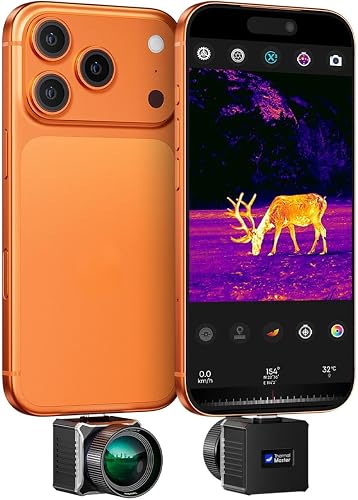
The Thermal Master T2 Max is the clearest fit for birders who want thermal viewing on a phone. Thermal Master says its dedicated birdwatching mode reduces sky-temperature interference and helps small heat signatures stand out.
A 15 mm manual-focus lens works with a native 256 x 192 sensor and 50 Hz imaging. X³ processing produces an enhanced 512 x 384 image, while up to 15× digital zoom enlarges the scene rather than adding captured detail.
The setup uses an iOS or Android phone and draws power from the phone or included rechargeable handle. Thermal Master claims up to 6 hours of combined runtime, so include your phone's other jobs in your power plan.
Its IP54 protection calls for more care around water than the better-protected standalone picks. Keep the connected phone sheltered too, since the camera's protection doesn't cover your whole setup.
Buy it for shared-screen birding and adjustable focus. Skip it if you want to leave your phone packed away or expect frequent wet-weather use.
AGM Taipan V2 Thermal Monocular
- Sub-35 mK thermal detector
- Photo and video recording with sound
- 16 GB storage
- IP67 protection
On-device recording with sound suits observers who want to save encounters without using a phone for capture. A replaceable rechargeable battery and power-saving tilt sensor support longer sessions.
Pros
- On-device recording with sound
- Replaceable rechargeable battery
- IP67 protection
Cons
- Narrower field of view than the RIX models
- Less storage flexibility than removable media would offer
The AGM Taipan V2 suits wildlife watchers who want photos and video with sound saved directly on the device. Its 16 GB storage lets you record an encounter without making phone capture part of the moment.
AGM Connect adds wireless streaming, settings control and footage review. The device also includes picture-in-picture, hot tracking and four thermal palettes, giving you several ways to watch and document a scene.
AGM claims up to 7 hours of operation from a replaceable rechargeable battery. A tilt sensor turns off the display when it isn't in use, which helps reduce wasted power between scans.
IP67 protection and rubber-overmolded housing suit outdoor observation. Its 10-degree field of view covers less area at once than the RIX models, so searching a broad field will require more overlapping passes.
Buy it when recording is part of every outing, especially if you prefer saving footage before involving a phone. Skip it if broad-area scanning matters more than on-device documentation.
RIX Pocket K3 Thermal Monocular
- 384 x 288 thermal sensor
- 50 Hz frame rate
- Electronic image stabilization
- Wi-Fi connectivity
The highest native thermal resolution in this group suits observers who put image detail first. Its compact body, stabilization and tripod interface support handheld scans and longer stationary viewing.
Pros
- Highest native sensor resolution here
- Electronic image stabilization
- Standard tripod interface
Cons
- Detection range doesn't guarantee species identification distance
- 8 GB storage is less than the 16 GB alternatives
The RIX Pocket K3 is the pick for observers who put native thermal detail ahead of the overall ranking. Its 384 x 288 sensor captures more thermal pixels than the other models here, paired with a 15 mm objective lens.
It offers 2× base magnification, a 17.5-degree horizontal field of view and 50 Hz imaging. Electronic image stabilization helps reduce small hand movements, while a standard 1/4"-20 interface supports tripod use.
Photos, audio and video save to 8 GB of memory, and Wi-Fi supports remote viewing and file transfer. Clear older files before an outing if you plan to record often.
RIX claims detection up to 853 yd under controlled conditions. That figure depends on target size and surroundings, and it doesn't guarantee a useful bird-identification distance.
Buy it for the extra captured detail, especially when comparing animal outlines at a sensible distance. Skip it if your main need is simple nearby detection and you would rather prioritize endurance or more recording space.
CVLIFE Thermal Monocular
- 256 x 192 thermal resolution
- 1024 x 768 display
- Picture-in-picture viewing
- Up to 8 hours of runtime
Picture-in-picture and hotspot tracking suit observers watching a field edge for movement. Built-in storage saves photos and video, while external power support offers another option for extended viewing.
Pros
- Picture-in-picture viewing
- 16 GB recording storage
- External power support
Cons
- Less water protection than IP67 alternatives
- Lower native sensor resolution than Pocket K3
The CVLIFE Thermal Monocular suits observers who watch field edges and want several viewing aids in one device. Picture-in-picture helps keep an enlarged area visible alongside the main scene, while hotspot tracking draws attention to a warm point.
Its 256 x 192 sensor feeds a 1024 x 768 display, with 50 Hz imaging. The screen has more pixels than the sensor, so its display figure shouldn't be mistaken for captured thermal resolution.
The device offers 2.4× base magnification, electronic zoom and six color modes. Photos and video save to 16 GB of built-in memory, with Wi-Fi and app support for viewing and file transfer.
CVLIFE claims up to 8 hours of runtime and provides fast-charging and external-power support. Its IP65 protection is worth weighing against your expected rain exposure.
Buy it for stationary viewing with recording and picture-in-picture. Skip it if manual focus is a firm requirement, or choose a better-protected model if wet outings are routine.
How should you choose a wildlife thermal camera?
Choose around the animal, distance and habitat you actually observe. Scanning for large mammals across an open field requires a different balance from finding small birds among branches.
Write down your usual outing length, likely weather and need for recordings before comparing features. This keeps a long range claim or large display number from outweighing something you'll use every evening.
How much thermal camera resolution does wildlife observation need?
More native sensor pixels give you more captured detail, but their value depends on how much of the image the animal fills. A small subject far away can still occupy too few pixels for a useful outline.
Choose higher native resolution when separating shapes matters more than simply finding heat. For casual detection at closer distances, handling, focus and carry comfort may matter more.
Keep sensor resolution, display resolution and software enhancement separate. A sharper screen or enlarged image can't supply the same captured information as a higher-resolution sensor.
Our guide to thermal camera resolution, range and selection explains how to weigh these numbers together.
Is a wider field of view always better?
A wider view helps you search woodland gaps or sweep a broad field without losing your place. A narrower view makes careful scan overlap more important and can make nearby moving animals harder to keep in frame.
Start with the widest available view when searching, then enlarge only after finding something worth inspecting. High digital zoom shrinks your view of the surroundings and makes hand movement more distracting.
When do focus and refresh rate matter most?
Manual focus is useful when you move between nearby branches and distant field edges. Fixed focus suits quick checks when you prefer fewer adjustments, but it gives you no way to fine-tune the lens.
Higher refresh rates help the view remain smoother during panning and movement. For a resting animal watched from one position, refresh rate is less central than clear focus and useful image detail.
Does thermal sensitivity matter in mild weather?
Thermal sensitivity describes how small a temperature difference the sensor can distinguish. A lower NETD figure indicates finer sensitivity, which can help when animals and their surroundings have similar temperatures.
Compare this alongside resolution and lens design rather than treating it as a single winning number. Sun-warmed vegetation, damp air and distance still affect the scene.
How much weather protection and battery life do you need?
Choose protection for the conditions you expect, with room for an unexpected shower. IP65 describes protection against water jets, while IP67 adds protection for temporary immersion under specified conditions; neither grants unlimited protection.
Keep ports covered as instructed, and check care limits before charging a damp device. Drop resistance, operating temperature and water protection describe different risks.
For power, allow a reserve for a delayed return and extra recording. Replaceable batteries help only if you carry charged, compatible spares, while external power adds a cable and another item to protect.
What can thermal imaging show through foliage and darkness?
Thermal imaging can reveal exposed warm surfaces without visible light, but leaves, trunks and other solid objects still block the view. It may help you find an animal through gaps in cover, rather than through the cover itself.
Fog and humidity can reduce useful contrast and range. Avoid choosing a device on the promise that it will reveal every animal in dense brush.
Ordinary window glass also blocks the long-wave infrared used by these devices. Scan from an open window or outside, rather than assuming a closed vehicle window will provide a clear thermal view.
Our explanation of whether thermal cameras can see through walls covers this limit in more detail.
Detection means noticing a possible heat source; recognition means seeing enough shape to judge the kind of subject. Confirming a species usually needs more detail, movement clues or a visible-light view.
For a fuller explanation of the image itself, read how a thermal imaging camera works.
How should you set up a thermal monocular before an outing?
Set up the controls, power and recording before darkness makes small adjustments harder. Learn which button changes palettes, starts recording and returns to the normal view without relying on a bright phone screen.
- Charge and check storage. Leave enough room for new footage, and confirm that any spare battery is compatible and ready.
- Set the viewing position. Adjust the eyepiece if your model allows it, then focus the thermal lens separately if it has manual focus.
- Start with a simple palette. White-Hot or Black-Hot makes it easier to learn shapes before adding color.
- Lower screen brightness. Use a comfortable level that lets you see the image without unnecessary glare.
- Check the recording path. Save a short clip, stop it and confirm where it appears before you leave.
For a phone-based setup, confirm the connector fit, app access and capture controls while you have light and a reliable connection. Check that your phone case doesn't prevent the connector from seating properly.
Keep the screen and controls accessible without leaving cables dangling where they can catch on branches. Bring the phone power reserve you need for maps and communication as well as thermal viewing.
How do you find wildlife without losing the subject?
Scan slowly, in overlapping sections, and pause when a shape needs a closer look. Fast sweeps can hide small animals among warm branches, rocks and patches of ground.
Start with field edges, clearings and visible gaps in vegetation from a safe, permitted viewpoint. Check both ground level and branches rather than assuming every heat source will be at eye height.
Once you notice a subject, note a visible landmark before changing optics. A forked trunk, fence post or gap in the skyline helps you find the same spot with binoculars.
Watch for movement and changing outlines before deciding what the heat source is. A sun-warmed rock stays warm too, and hotspot tracking can select something other than an animal.
Use a tripod or brace your arms when observing from one position. Stabilization helps with small movements, but it doesn't replace a steady hold during prolonged viewing or heavy digital enlargement.
Give wildlife space and avoid repeated approaches to a roost, den or resting place. Don't walk while looking through the eyepiece, since the narrow thermal view won't show every trip hazard.
Which common mistakes make thermal wildlife images harder to read?
The biggest mistakes are using too much zoom, trusting range claims and expecting visible-light detail. Correct those habits before assuming you need a different device.
- Enlarging too early: Find the subject at the widest view first, then use modest enlargement to inspect it.
- Leaving focus unchanged: With a manual-focus model, refocus when moving between nearby cover and distant ground.
- Switching palettes constantly: Learn one simple palette well so you can compare shapes consistently.
- Treating red as proof of an animal: Colors depend on the selected palette and temperature scale, rather than identifying a species.
- Expecting clear views through cover: Change your viewing angle to find a gap instead of increasing zoom.
- Comparing maximum ranges directly: A range based on a tall heat source doesn't describe performance on a small bird.
Warm afternoons can leave the background full of competing heat sources. Cooler periods may give you clearer separation, but useful contrast still depends on weather and the surfaces in view.
Learn what thermal camera colors mean before relying on a colored hotspot. Temperature patterns make more sense when you understand how the palette maps them.
How should you clean and store a wildlife thermal camera?
Protect the lens surface, ports and battery after every outing. Close the lens cover during transport and use a case that keeps the device from rubbing against other gear.
Remove loose grit before wiping the lens, then use lens-safe materials and the cleaning method recommended for that model. Don't scrub mud across the lens or apply household cleaners.
Dry the exterior after wet use and let moisture clear before charging or closing the device away in storage. Water protection doesn't make charging a wet port safe.
Avoid leaving the device in a hot vehicle, and follow its battery storage instructions during long breaks between outings. Never aim it at the sun or another intense heat source.
How did EarnestEave choose these wildlife monoculars?
EarnestEave compared sensor detail, handling, power, protection and recording tools for wildlife observation. Scores reflect that overall mix, while the individual recommendations explain which tradeoffs suit different outings.
The highest-resolution model doesn't automatically lead because carry convenience and endurance also matter. Likewise, extra palettes and recording tools help only if they match how you observe.
A thermal camera is one part of a viewing setup. Our thermal camera buyer's guide covers broader uses, while the guide to choosing a night vision monocular helps if visible scene detail matters more.
Which thermal imaging camera for wildlife should you choose?
Choose the TOPDON TS004 if long sessions and a dedicated handheld design lead your needs. Choose the RIX Pocket K2 if you'll carry it beside binoculars and use it for quick scans throughout a walk.
For slow observation from a fixed spot, the GOYOJO G210 offers replaceable batteries and several palette choices. The Thermal Master T2 Max suits birders who want a shared phone screen and a mode designed around small heat signatures.
Choose the AGM Taipan V2 when saving encounters directly on the device is a priority. Put the RIX Pocket K3 first on your own shortlist when native thermal detail matters most, or consider CVLIFE for field-edge viewing with picture-in-picture.
Before buying a thermal imaging camera for wildlife, decide how you'll confirm what you find. Use our night vision vs thermal guide to choose the right companion optics for your outings.
Our top 3 picks at a glance
-
1
-
2
-
3
Frequently asked questions
Can a thermal monocular identify a bird?
A thermal monocular can locate a bird, but it usually can't confirm its species from heat alone. Body shape, movement and location offer clues, while feather colors and fine markings require visible-light optics; use binoculars or a camera to confirm the identification when light and distance allow.
Is thermal imaging useful for birding?
Yes, thermal imaging can help you find perched or roosting birds in darkness and through gaps in foliage. Thermal Master says the T2 Max's birdwatching mode reduces sky-temperature interference to highlight small heat signatures; keep your distance from roosts, and use visible-light optics for species confirmation when conditions allow.
What does detection range mean on a thermal monocular?
Detection range means a device may reveal a heat source at that distance, not show enough detail to identify an animal. A large warm target is easier to detect than a small bird; temperature contrast, humidity, terrain and vegetation all affect the useful distance, so compare range claims with care.
Can you use a thermal monocular in daylight?
Yes, thermal monoculars work in daylight because they detect emitted heat rather than visible light. Sun-warmed rocks, trunks and ground can make animals harder to separate from the background; scan slowly and watch for movement, and never aim the device at the sun or another intense heat source.
How is a thermal monocular different from night vision?
A thermal monocular shows heat patterns, while night vision uses available or added light to reveal a scene. Thermal helps you find warm animals; night vision can help show their surroundings and visible features; our night vision vs thermal guide explains which approach fits different kinds of observation.